
Marketing agency owners recognize LinkedIn as essential for B2B clients. With over 1.2 billion professionals on the platform according to DataReportal and research showing 89% of B2B marketers use LinkedIn for lead generation, your ability to deliver measurable LinkedIn performance results directly impacts client retention and growth.
The challenge appears when managing LinkedIn metrics manually. What works for 3 clients becomes completely unsustainable at 10 or 20.
The right LinkedIn analytics tools transform agency operations and deliver more value to clients through comprehensive data analysis and automated reporting.
Critical Factors When Evaluating LinkedIn Analytics Tools
Several factors matter when evaluating LinkedIn analytics tools for your agency:
- Efficiency scaling factors How does the tool perform as you add more clients? Look beyond features to how the platform handles multi-client management and reporting automation. Tools that specifically track Video Retention Rates and Short-form engagement?
- Data comprehensiveness Does it cover both LinkedIn Pages and LinkedIn Ads? How granular is the data for audience demographics, engagement metrics, and conversion tracking?
- Client-ready reporting Can you generate professional reports that reflect your agency’s branding? How much customization is possible for LinkedIn performance dashboards?
- Integration capabilities How well does it connect with other platforms in your marketing stack? This becomes increasingly important as clients expect unified reporting across LinkedIn and other marketing channels.
- Value-to-investment ratio Consider not just the subscription cost, but implementation time, training requirements, and ongoing management overhead for LinkedIn analytics solutions.
- Predictive & Generative AI: Does the tool just report what happened, or does it use AI to predict best posting times and suggest content improvements based on historical data?
Examine these leading LinkedIn analytics tools through these agency-specific lenses:
Quick Picks
| Tool | Best For | 2025 Highlight Feature |
| Swydo | Reporting Automation | Combined Data Sources (Cross-channel) |
| SocialPilot | Mid-sized Agencies | Approvals On-The-Go |
| Sprout Social | Enterprise | Sentiment Analysis |
| Shield | Personal Branding | Creator-focused metrics |
1. SocialPilot – LinkedIn Management Tool for Growing Agencies

SocialPilot positions itself as a social media management platform with strong LinkedIn capabilities, particularly suited for agencies managing multiple client accounts.
LinkedIn analytics capabilities
- LinkedIn Page analytics including follower demographics, content reach, and engagement metrics
- Post-level analytics showing performance by content type and engagement rates
- Exportable white-label PDF reports with agency branding for LinkedIn performance
- Client approvals without requiring platform login for LinkedIn content
According to SocialPilot’s official documentation, the platform supports direct scheduling to LinkedIn Company Pages and Personal Profiles, including carousel posts via PDF uploads, with comprehensive performance tracking.
Agency-specific considerations
- The Premium plan ($85/month annually) includes 6 users and 25 social accounts with white-label LinkedIn reports
- Client approval workflows exist starting from the Premium plan for LinkedIn content management
- The “Approvals On-The-Go” feature lets clients review LinkedIn content without logging in
- SocialPilot emphasizes ease of use and shorter learning curve compared to enterprise LinkedIn management platforms
When SocialPilot fits If your agency manages primarily organic LinkedIn content for multiple small to mid-sized clients, SocialPilot offers a balance of functionality and affordability. It provides particular value for agencies prioritizing ease of client collaboration and LinkedIn approval processes.
When alternatives make sense Agencies deeply focused on LinkedIn Ads management or requiring advanced competitive analytics might need supplementation with dedicated LinkedIn Ads tools or social listening platforms for comprehensive performance measurement.
2. Sprout Social – Enterprise-Grade LinkedIn Analytics Platform

Sprout Social offers comprehensive social media management with dedicated LinkedIn analytics modules for both Pages and Ads performance measurement.
LinkedIn analytics capabilities
- Dedicated LinkedIn Pages Report and LinkedIn Paid Performance Report with detailed metrics
- Detailed audience demographics including seniority and job positions for LinkedIn followers
- Competitive benchmarking capabilities for LinkedIn performance against industry standards
- Performance comparison between organic and paid LinkedIn content with ROI analysis
- Team collaboration features with approval workflows for LinkedIn content management
According to Sprout Social’s official documentation, their Premium Analytics add-on provides enhanced customization options for LinkedIn reporting, allowing agencies to tailor data presentation to client needs with advanced metrics and visualizations.
Agency-specific considerations
- Pricing follows a per-seat model, starting at $199/seat/month annually for LinkedIn management
- Advanced features like sentiment analysis for LinkedIn engagement appear in higher-tier plans
- The Enterprise plan offers the most extensive white-labeling capabilities for LinkedIn reporting
- The platform provides robust team collaboration features for LinkedIn content strategy
When Sprout Social fits Established agencies serving enterprise clients with sophisticated reporting requirements benefit from Sprout Social’s depth and polish that supports premium service positioning. The comprehensive team collaboration features provide value for larger agency teams managing complex LinkedIn strategies.
When alternatives make sense Smaller agencies or those with tight operational budgets might find the per-seat pricing model challenging as teams grow. The platform’s complexity also creates a steeper learning curve for LinkedIn analytics that requires more substantial team training investment.
3. Swydo – Cross-Channel Marketing Report Automation
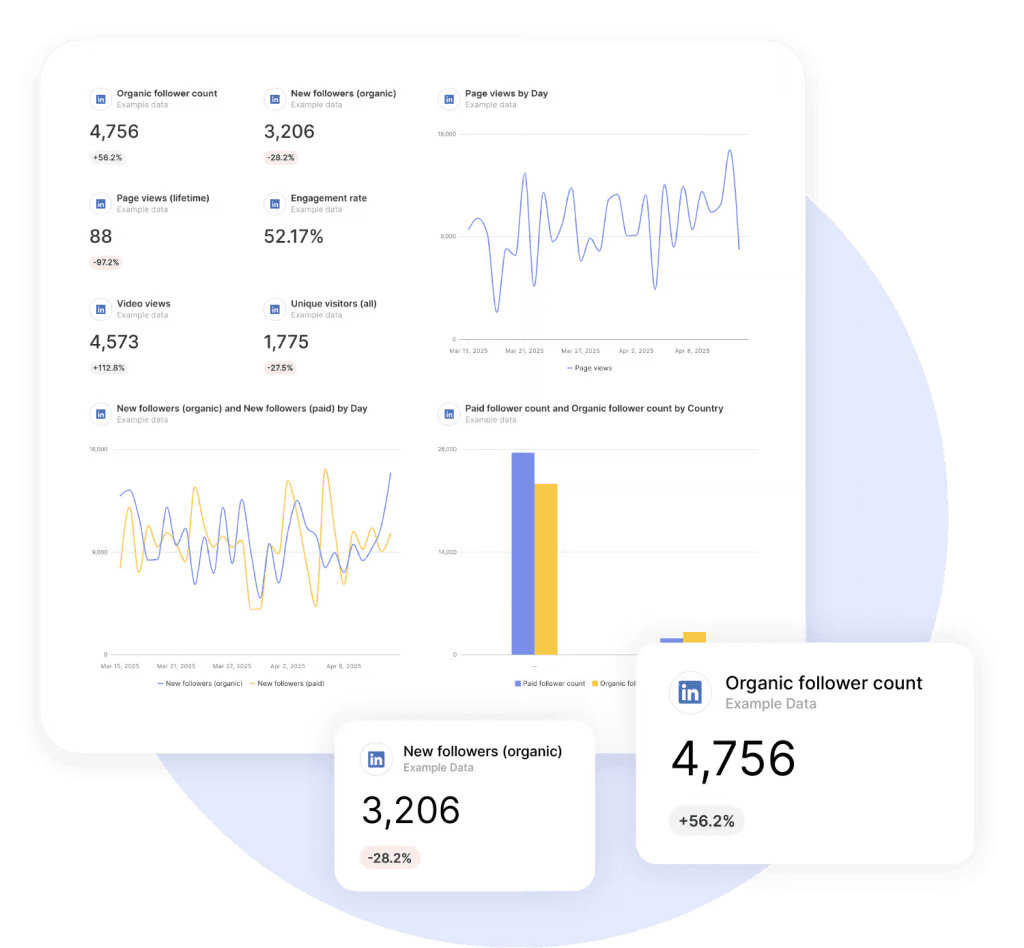
Swydo focuses specifically on marketing reporting automation rather than social media management, with strong capabilities for LinkedIn data integration and performance visualization.
LinkedIn analytics capabilities
- Integration with both LinkedIn Pages and LinkedIn Ads for comprehensive performance data
- Over 200 available metrics for LinkedIn Ads campaigns including conversions and ROI
- Custom dashboard creation for LinkedIn performance monitoring with real-time updates
- Automated report generation and delivery for LinkedIn marketing performance
- Data blending capabilities to connect LinkedIn metrics with other marketing channels for attribution analysis
- LinkedIn Revenue Attribution Report template for tracking ad spend, leads, pipeline, and revenue
Swydo’s platform allows unlimited users, clients, and reports in all plans, with pricing based on data sources rather than users, making it flexible for agencies scaling their LinkedIn reporting.
Agency-specific considerations
- Pricing starts at $69/month for 10 data sources including LinkedIn analytics
- Complete white-labeling includes custom domain and branding for LinkedIn performance reports
- The platform specializes in cross-channel marketing reports connecting LinkedIn with other platforms
- No user limits or feature restrictions based on plan tier for LinkedIn report creation
- With the 2025 introduction of Combined Data Sources, Swydo solves the fragmentation issue, allowing agencies to merge LinkedIn Ads metrics with TikTok and Google Ads in a single widget to show true cross-channel ROAS
- Data Health Check Alerts notify when LinkedIn connections break due to password changes or permission updates
Agency workflow enhancements
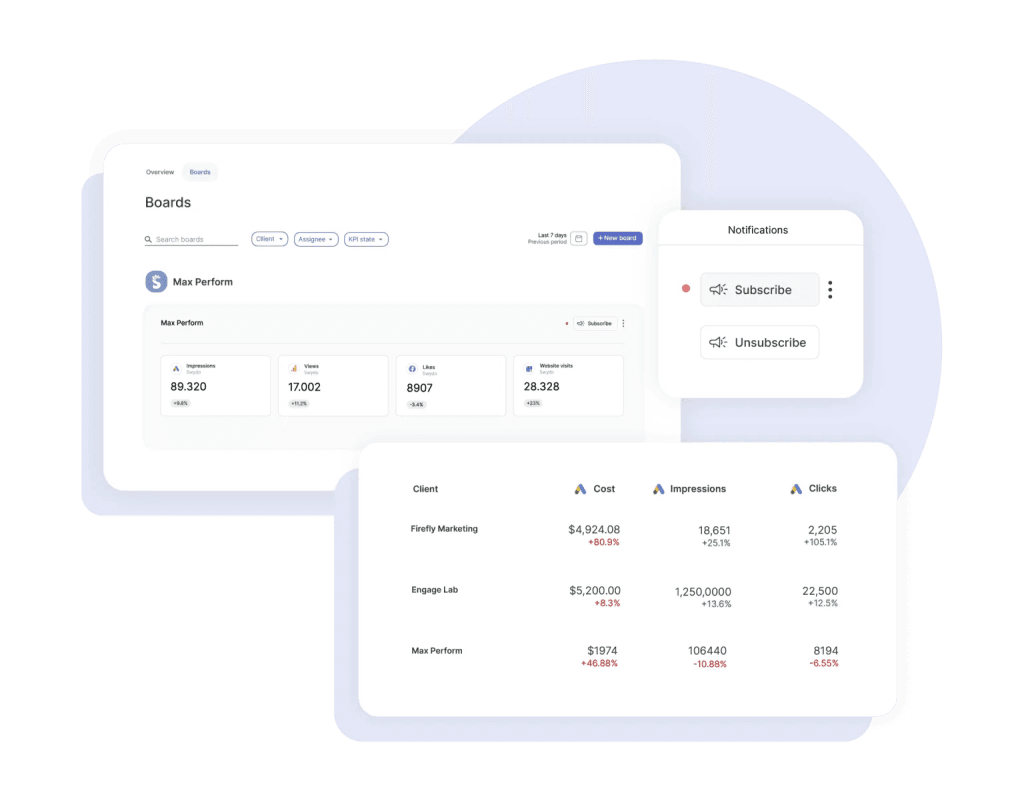
- Monitoring Overview dashboard for tracking key LinkedIn metrics across multiple clients from a single view
- Team workflow features including automated transfer of LinkedIn reports when team members leave
- Revamped scheduling overview for managing all client LinkedIn reports in one place
- Resizable widget grid for creating more visually compelling LinkedIn reports
- Trash bin feature to recover accidentally deleted LinkedIn reports for up to 90 days
When Swydo fits Agencies that need to connect LinkedIn performance with other marketing channels in comprehensive client reports benefit from Swydo’s specialized reporting capabilities. It provides particular value for agencies scaling their reporting operations across multiple clients while maintaining consistent branding and report quality.
When alternatives make sense Since Swydo focuses on reporting rather than management, agencies need separate tools for LinkedIn content publishing and engagement. It serves ideally as a reporting layer on top of other LinkedIn management platforms for complete analytics solutions.
4. Brand24 – Social Listening for LinkedIn Intelligence

Brand24 monitors conversations across social media, including LinkedIn, to provide insights beyond owned media performance metrics.
LinkedIn analytics capabilities
- Real-time monitoring of LinkedIn mentions and conversations for brand tracking
- Sentiment analysis of LinkedIn content related to brands for reputation management
- Identification of key LinkedIn influencers discussing relevant topics for partnership opportunities
- Tracking of hashtag performance and campaign mentions on LinkedIn
- Detection of sudden engagement spikes on LinkedIn that may indicate opportunities or issues
According to Brand24’s documentation, the platform analyzes social media mentions to provide insights into brand perception and industry conversations on LinkedIn, complementing traditional performance metrics.
Agency-specific considerations
- Pricing starts at $199/month for the Individual plan with LinkedIn monitoring
- Higher tiers offer additional keywords, mentions, and users for broader LinkedIn listening
- White-labeled reports exist in Business and Enterprise plans for client-ready LinkedIn insights
- The platform focuses on listening rather than owned content performance on LinkedIn
When Brand24 fits Agencies offering reputation management or competitive intelligence services gain valuable insights beyond traditional LinkedIn analytics from Brand24. It helps identify industry trends and conversation patterns on LinkedIn that inform content strategy and positioning.
When alternatives make sense Agencies focused primarily on managing owned LinkedIn content need to pair Brand24 with a LinkedIn management platform. It functions most effectively as a complementary tool rather than a comprehensive LinkedIn analytics solution.
5. Shield Analytics – LinkedIn Personal Profile Measurement Solution

Shield Analytics focuses exclusively on LinkedIn personal profile analytics, catering to agencies managing executive thought leadership or personal branding initiatives on LinkedIn.
LinkedIn analytics capabilities
- Performance tracking for LinkedIn personal profiles with engagement measurement
- Content engagement analytics by post type and topic for LinkedIn personal content
- Audience growth and demographic insights for individual LinkedIn users
- Optimal posting time recommendations based on historical LinkedIn performance data
- Export capabilities for client reporting on personal LinkedIn profile performance
According to Shield’s documentation, the platform serves specifically LinkedIn creators, thought leaders, and sales professionals building personal brands on the platform with dedicated analytics.
Agency-specific considerations
- Pricing is per-profile (starts ~$12/month)
- Basic plans include limited data history for LinkedIn performance
- The platform focuses exclusively on personal profiles, not LinkedIn Company Pages
- Design centers on individual LinkedIn optimization rather than multi-client management
When Shield fits Agencies managing executive thought leadership programs or personal branding for professionals on LinkedIn gain specialized insights not available in Company Page-focused tools from Shield. It provides particular value for agencies working with industry influencers or sales-focused clients building LinkedIn presence.
When alternatives make sense Agencies primarily managing LinkedIn Company Pages need different tools. Shield serves as a specialized addition to a broader LinkedIn analytics stack rather than a comprehensive solution.
6. Hootsuite – Multi-Platform Social Management System

Hootsuite offers LinkedIn analytics as part of its broader social media capabilities and performance measurement.
LinkedIn analytics capabilities
- LinkedIn Page performance tracking including engagement and reach metrics
- Audience demographics analysis for LinkedIn followers
- Content performance analytics by post type for LinkedIn content strategy
- Basic reporting on organic and paid LinkedIn content effectiveness
- Team collaboration features for LinkedIn content approval and publishing workflow
According to Hootsuite’s documentation, the platform provides unified social media management across multiple networks, with LinkedIn as one of its supported platforms for analytics and content management.
Agency-specific considerations
- Pricing follows a per-user model, starting at $99/user/month annually for LinkedIn management
- Social profile limits vary by plan tier for LinkedIn account management
- Advanced features like team productivity reporting for LinkedIn require higher-tier plans
- White-labeling capabilities for LinkedIn reports increase with plan level
When Hootsuite fits Agencies managing social media holistically across multiple platforms benefit from Hootsuite’s unified management capabilities for LinkedIn and other networks. Its long history and established presence make it familiar to many social media professionals handling LinkedIn accounts.
When alternatives make sense Agencies specifically focused on LinkedIn performance might find more specialized tools offer deeper LinkedIn-specific insights. The per-user pricing model can also become costly as teams grow and manage more LinkedIn accounts.
7. LinkedIn Native Analytics – Free Starter Solution

LinkedIn’s built-in analytics provide basic insights for Company Pages and Campaign Manager at no additional cost, offering fundamental performance data.
LinkedIn analytics capabilities
- Company Page metrics including followers, visitors, and engagement rates
- Post-level performance data for organic LinkedIn content effectiveness
- Audience demographics including job function, seniority, and industry of LinkedIn followers
- Campaign performance metrics in LinkedIn Campaign Manager for ad optimization
- Competitor comparison for up to 9 profiles on LinkedIn
According to LinkedIn’s official documentation, native analytics include visitor, follower, and content engagement metrics directly from the platform, providing baseline performance data.
Agency-specific considerations
- Entirely free but requires direct access to client LinkedIn accounts
- No white-labeling or automated reporting capabilities for client presentations
- Limited historical data compared to specialized LinkedIn analytics tools
- No multi-client dashboard or consolidated reporting for agency management
When LinkedIn Native Analytics fit Very small agencies or those just beginning to offer LinkedIn services gain a no-cost starting point with native analytics. They also serve to verify data accuracy in third-party LinkedIn analytics tools. Note: LinkedIn’s May 2025 updates added enhanced creator analytics for profiles, including monetization insights, making it even stronger for solo users
When alternatives make sense As client rosters grow beyond 3-5 LinkedIn accounts, the manual effort of accessing individual LinkedIn accounts becomes prohibitively time-consuming. Specialized tools become necessary for efficiency and professional client reporting on LinkedIn performance. While LinkedIn Business Manager has improved multi-account access, native analytics still lack the ability to export cross-client PDF reports.
Common LinkedIn Analytics Questions Answered
How often should we report on LinkedIn analytics to clients? Most agencies find monthly reporting on LinkedIn performance strikes the right balance, though some enterprise clients may prefer bi-weekly updates on key metrics, especially during active campaigns. Create a standard reporting cadence but remain flexible for clients who need more frequent LinkedIn performance updates. Automated scheduling features like Swydo’s revamped Scheduled Overview make it easy to set up and manage multiple reporting frequencies for different clients.
Which LinkedIn metrics matter most for demonstrating ROI? Beyond basic engagement metrics, focus on conversion tracking, lead generation metrics, and click-through rates to demonstrate tangible business impact. Research shows LinkedIn has a 227% higher lead conversion rate compared to other social platforms, making these metrics particularly valuable for showing client ROI. For agencies with access to LinkedIn’s Business Manager, Swydo’s LinkedIn Revenue Attribution Report integration directly connects ad spend to pipeline value and revenue, creating a clear ROI picture.
How do we benchmark LinkedIn performance effectively? Effective LinkedIn benchmarking requires industry-specific comparisons rather than generic standards. Studies indicate that LinkedIn engagement rates vary significantly by industry, with technology content averaging 1.8% compared to 3.2% for marketing content. Use tools that provide industry benchmarks or create your own benchmarks based on client history and competitor analysis.
Can we effectively track LinkedIn performance without third-party tools? While LinkedIn’s native analytics provide basic insights, they become impractical for agencies managing multiple clients. Agencies using specialized LinkedIn analytics tools saved an average of several hours per client per month compared to manual reporting methods. The ability to create consistent, branded reports across all clients while avoiding the manual login process for each LinkedIn account represents significant time savings.
How do we integrate LinkedIn analytics with broader marketing reporting? Choose tools that offer API connections to your other marketing platforms or use dedicated reporting platforms like Swydo that specialize in cross-channel data integration. Swydo’s recently launched Combined Data Sources feature (currently in beta) allows agencies to merge LinkedIn Ads metrics with data from other platforms like Google Ads, Facebook Ads, and TikTok Ads into single widgets, making cross-channel performance comparison simpler.
How to Choose LinkedIn Analytics Tool for Your Agency Type
Consider how different platforms align with specific agency scenarios for LinkedIn analytics:
Tools for Small Agencies with 1-5 Clients
Core needs Basic LinkedIn management and reporting without significant investment in analytics tools.
Practical approach Start with LinkedIn native analytics combined with manual reporting templates. Entry-level plans from SocialPilot or similar platforms make sense as efficiency becomes more important for LinkedIn performance tracking.
Key consideration Focus on tools with straightforward learning curves that don’t require significant training investment for LinkedIn analytics implementation.
Tools for Growing Agencies with 6-15 Clients
Core needs Efficient multi-client management, professional LinkedIn reporting, and time savings.
Practical approach Implement a dedicated social media management platform like SocialPilot for LinkedIn content publishing and basic analytics. Add specialized reporting tools like Swydo as client reporting becomes more important for comprehensive LinkedIn performance analysis.
Growing agencies benefit from Swydo’s recent improvements to their reporting interface, including resizable widget grids that allow for more visually compelling LinkedIn data presentations. The ability to create custom-sized data visualizations helps agencies deliver more professional, engaging reports that showcase LinkedIn performance alongside other channels.
Key consideration Look for tools that scale efficiently as your client roster grows, with pricing models that don’t penalize growth in your LinkedIn management services. Swydo’s system of pricing based on data sources rather than user seats allows growing agencies to add team members without increasing costs.
Tools for Established Agencies with 16+ Clients
Core needs Comprehensive LinkedIn analytics, advanced reporting, team collaboration, and seamless client experience.
Practical approach Evaluate enterprise-grade platforms like Sprout Social for comprehensive LinkedIn management. Implement dedicated reporting platforms like Swydo for client-facing dashboards and reports integrating LinkedIn with other marketing channels.
Established agencies handling numerous clients need robust workflow systems. Swydo’s 2025 product updates directly address this with features like:
- Scheduled Overview page that provides a centralized view of all scheduled LinkedIn reports
- Monitoring Overview that consolidates key metrics across all clients into one dashboard
- Combined Data Sources (beta) that allow agencies to merge metrics from LinkedIn Ads with other ad platforms for holistic reporting
- Data Health Check Alerts that proactively notify when data connections break, preventing report delivery issues
Key consideration Prioritize platforms with robust API connections, team permission structures, and extensive white-labeling capabilities for professional LinkedIn analytics delivery. Look for features that help manage client transitions, like Swydo’s “Transfer Swydo Items” feature that ensures continuity when team members leave.
Tools for Specialized LinkedIn Agencies
Core needs Deep LinkedIn-specific insights, competitive intelligence, and thought leadership analytics.
Practical approach Combine multiple specialized tools like Shield Analytics for personal LinkedIn profiles, Brand24 for competitive LinkedIn listening, and dedicated LinkedIn management platforms for comprehensive performance measurement.
Key consideration Focus on tools that provide unique insights beyond basic LinkedIn metrics, allowing you to deliver specialized value to clients through advanced analytics.
3 Action Steps to Take Today
- Audit your current LinkedIn reporting process. Track hours spent per client and calculate your true cost. Most agencies discover they’re spending 3-5 hours per client monthly on reporting that could be automated.
- Test before you invest. Every tool mentioned offers a free trial. Start with Swydo if your priority is professional cross-channel reporting or SocialPilot if you need content management with basic analytics. Use real client data during your trial to accurately assess value.
- Prioritize client experience over features. The best analytics mean nothing if clients don’t understand them. Choose tools that translate complex LinkedIn data into clear business impact. Swydo’s customizable dashboards and SocialPilot’s straightforward reports typically outperform feature-rich alternatives in client satisfaction.
The goal isn’t more LinkedIn data—it’s better decisions from that data. Your clients don’t need every metric; they need the right insights delivered efficiently. The right tool saves you time while making your agency indispensable through strategic insights your competitors can’t provide.
LinkedIn Analytics Tools FAQ
Quick answers to the most common questions about LinkedIn analytics and reporting
LinkedIn analytics is a measurement system that tracks your content performance, audience engagement, and follower growth on the platform. It shows you who’s viewing your content, how they’re interacting with it, and key demographics like job titles, industries, and locations. You can access basic analytics for free through LinkedIn’s native tools, or use third-party platforms for more advanced insights and reporting capabilities.
For personal profiles: Click your profile picture, select “View Profile,” then scroll to the Analytics section and click “Show all analytics.” You’ll see post impressions, followers, and profile viewers.
For Company Pages: Log in as an admin, click “Analytics” in the left menu, and choose from Content, Visitors, Followers, Leads, or Competitors tabs. Note: You must be a page admin or have analyst access to view Company Page analytics.
Company Pages offer significantly more data than personal profiles. Pages include visitor demographics, follower growth sources (organic vs. paid), competitor benchmarking, employee advocacy metrics, and detailed content performance. Personal profiles show basic metrics like post impressions, profile views, and search appearances—but lack visitor demographics, competitor data, and advanced filtering options.
Yes. For Company Pages, you can export data as Excel files from each analytics section (Content, Followers, Visitors). LinkedIn Campaign Manager also allows data exports for ad campaigns. However, native exports are basic spreadsheets that require manual formatting for client presentations. Third-party tools like Swydo or Sprout Social automate this with branded, presentation-ready reports.
LinkedIn’s native analytics have limitations: an unfriendly interface, difficult date range selection that resets when switching tabs, no white-labeling, no automated reporting, and no multi-account dashboards. Third-party tools solve these problems with unified dashboards, automated report scheduling, cross-channel integration, competitive benchmarking, and AI-powered recommendations—essential for agencies managing multiple clients efficiently.
A good LinkedIn engagement rate is between 2% and 6%, with 3.85% being the current average. Below 1% suggests your content needs improvement; 1-4% is healthy; above 4% means you’re performing well. Engagement rates vary by industry—consulting and legal services average 2-5%, while marketing content can reach higher. Always benchmark against your own historical data and industry standards rather than generic numbers.
The standard formula is: (Reactions + Comments + Reposts) ÷ Impressions × 100. For example, if your post has 50 reactions, 10 comments, 5 reposts, and 2,000 impressions: (50+10+5) ÷ 2,000 × 100 = 3.25% engagement rate. Some tools also include clicks and video views in the calculation, so ensure you’re using a consistent formula when comparing performance over time.
Generally, Tuesday through Thursday between 8-10 AM and 12-2 PM show higher engagement. However, your specific audience may differ. Use LinkedIn’s analytics to see when your followers are most active—this beats generic advice. Post 2-5 times per week for optimal results. Experiment with different time slots for at least four weeks and track which time blocks deliver the best engagement, not just views.
Multi-image posts lead with approximately 6.6% average engagement, followed by native documents (carousels/PDFs) at 6.1%, and video posts at 5.6%. Polls have doubled their engagement and now average 4.4%. Standard image posts average 4.85%, while text-only posts hover around 4%. Document and carousel posts generate significantly more engagement than articles or status updates—experiment with less common formats to stand out.
Beyond vanity metrics, focus on: conversion rate (leads generated per click), cost per lead, click-through rate (CTR), and lead quality scores. LinkedIn delivers significantly higher B2B lead conversion rates than other platforms, so track how leads progress through your sales funnel. For brand awareness campaigns, measure reach, impressions per follower, and share rate (aim for 3%+). Connect LinkedIn performance to pipeline value and revenue when possible.
LinkedIn’s native analytics lets you compare your Company Page against up to 9 competitors for metrics like follower growth and engagement. For deeper competitive analysis, use tools like Brand24 for social listening or Sprout Social for competitive benchmarking. Compare against three reference points: your historical performance, industry averages, and top competitors. Analyze what content types and posting frequencies drive their best results.
It depends on your needs. For mid-sized agencies wanting value and ease of use: SocialPilot ($85/month for 6 users). For enterprise with advanced needs: Sprout Social ($199+/seat/month). For cross-channel reporting: Swydo ($69/month for 10 data sources). For personal profile analytics: Shield Analytics (~$12/month per profile). For social listening: Brand24 ($199+/month). Most agencies combine 2-3 tools for complete coverage.
Costs range widely: LinkedIn native analytics are free but limited. Entry-level tools like Buffer start around $25/month. Mid-tier options like SocialPilot run $85-170/month. Enterprise platforms like Sprout Social cost $199-399/seat/month. Specialized reporting tools like Swydo charge $69-249/month based on data sources, not users. Consider total cost including implementation time, training, and whether pricing scales by users or data sources as you grow.
All-in-one platforms (Sprout Social, Hootsuite) work best if you manage multiple social networks and want unified dashboards. Specialized tools work better for specific needs: Shield for executive thought leadership analytics, Brand24 for competitive listening, or Swydo for cross-channel client reporting. Many successful agencies combine an all-in-one management platform with a dedicated reporting tool for the best of both worlds.
Prioritize: multi-client management (can you see all accounts in one dashboard?), white-label reporting (can you brand reports for clients?), automation (does it schedule and send reports automatically?), data comprehensiveness (does it cover both Pages and Ads?), and integration capabilities (does it connect with your other marketing tools?). Also consider the learning curve—complex tools require more training investment.
LinkedIn ads average $2-3 per click (CPC), $5-8 per 1,000 impressions (CPM), and $0.26-0.50 per send for Sponsored Messaging. These costs are higher than Facebook or Google because LinkedIn targets professionals and decision-makers. LinkedIn requires a minimum $10 daily budget or $100 lifetime budget. Actual costs depend on your targeting (senior executives cost more), industry competition, and ad relevance score.
The average CTR for LinkedIn Sponsored Content is 0.44%-0.65% globally. Above 0.65% is considered strong performance. CTR varies by ad format—Sponsored Messaging tends to have higher open rates but different engagement patterns. To improve CTR, use compelling visuals, clear calls-to-action, and ensure your targeting aligns with your message. A higher CTR improves your quality score and can lower your overall ad costs.
LinkedIn Lead Gen Form completion rates average 6-10%, while website conversion rates average 2-3%. Conversion rates vary significantly by industry—IT services average around 1.5%, while legal services can reach 7.4%. To improve conversions, use LinkedIn’s native Lead Gen Forms (they keep users on-platform), ensure landing pages match your ad messaging, and test different offers. Focus on lead quality, not just quantity.
For B2B marketing, yes—57% of companies report satisfaction with LinkedIn ads ROI. LinkedIn costs more than Facebook or Google, but delivers higher-quality B2B leads with significantly better conversion rates. The platform lets you target by job title, company size, industry, and seniority in ways other platforms can’t match. Calculate your cost per qualified lead and close rate to determine true ROI for your specific business.
Improve your ad relevance score by creating compelling, targeted content—higher relevance scores mean lower costs. Narrow your audience to those most likely to convert rather than broad targeting. Use A/B testing to identify top-performing creative and copy. Consider LinkedIn’s Lead Gen Forms instead of website conversions for better completion rates. Start with a smaller budget to gather data, then scale what works.
Monthly reporting works best for most clients—it provides enough time for trends to emerge without overwhelming with data. Enterprise clients may want bi-weekly updates during active campaigns. Offer real-time dashboards for clients who want on-demand access between formal reports. Use automated scheduling to manage multiple reporting frequencies efficiently without adding manual workload.
Start with LinkedIn’s free native analytics combined with manual reporting templates to minimize costs. As you grow, entry-level plans from SocialPilot ($85/month for 25 accounts) offer excellent value. At this stage, focus on tools with short learning curves rather than feature-rich enterprise platforms. Perfect your reporting templates and client communication before investing in more sophisticated tools.
Combine a management platform like SocialPilot for content publishing with a dedicated reporting tool like Swydo for cross-channel analytics. Look for tools that price by data sources rather than user seats—this lets you add team members without increasing costs. Features like client approval workflows, white-label reports, and centralized monitoring dashboards become essential at this stage.
Enterprise platforms like Sprout Social provide comprehensive LinkedIn management, team collaboration, and advanced reporting. Pair with specialized reporting platforms for client-facing dashboards integrating LinkedIn with other channels. Prioritize features like team permission structures, automated report scheduling across all clients, data health alerts when connections break, and workflow tools for managing client transitions when team members leave.
Tools like Swydo, Sprout Social, and SocialPilot offer white-label reporting with custom branding, logos, and even custom domains. Swydo provides complete white-labeling in all plans. SocialPilot includes white-label PDF reports starting at the Premium tier. Sprout Social offers extensive white-labeling in Enterprise plans. Native LinkedIn exports don’t support white-labeling—you’d need to manually reformat spreadsheets.
Use reporting platforms like Swydo that specialize in cross-channel data integration. Features like Combined Data Sources let you merge LinkedIn Ads metrics with Google Ads, Facebook Ads, and other platforms in single widgets for true cross-channel ROAS comparison. This shows clients how LinkedIn contributes to overall marketing performance. All-in-one platforms like Sprout Social and Hootsuite also offer unified cross-platform dashboards.
See all your LinkedIn metrics in one dashboard and deliver reports clients actually read.
Start Your Free Trial Today