
If you run paid search, someone has probably asked you this lately: should we be advertising in ChatGPT, and does that money come out of the Google budget?
It’s a fair question. OpenAI says ChatGPT now reaches 1.2 billion people every week. Its ad platform has grown from an invite-only pilot into a self-serve auction that PPC Land reports is available to advertisers in 89 countries. At the same time, Google is putting ads inside its own AI answers, using campaigns you’re probably already running.
So the real comparison isn’t “old search vs new AI.” It’s two very different ways of buying attention inside AI-powered answers. This guide walks through how each one works, what it costs, how it performs, who it fits, and how to test ChatGPT Ads without hurting the Google results that pay the bills.
The Short Answer for Busy Marketers
Google Ads is still where you capture people who are ready to act. You get keyword control, mature conversion tracking, and click-through rates that ChatGPT can’t touch yet. ChatGPT Ads is cheap to start and reaches people while they’re still researching and comparing options. It gives you far less control and far less visibility into what’s working.
For most businesses, the right move is to keep Google as the core and treat ChatGPT as a capped, carefully measured test. Here’s how that plays out in practice:
- Lead with Google Ads if you depend on high-intent searches (“emergency plumber near me,” “buy running shoes size 10”) or need predictable cost per lead next month.
- Add a ChatGPT Ads test if your product is a considered purchase that people research, compare, or ask advice about before buying. You can track conversions properly.
- Hold off on ChatGPT Ads if you sell into restricted categories, need to reach paying ChatGPT subscribers and business users (they don’t see ads), or can’t afford a test budget large enough to produce a real answer.
What ChatGPT Ads and Google Ads Actually Are
Both platforms run auctions and both charge for attention. They decide when to show your ad in completely different ways. One analogy gets you most of the way there. The mechanics underneath explain the rest.
An Analogy That Gets You Most of the Way
Think of Google Search as a store directory. A shopper walks up and types exactly what they want. The businesses that bid on those words get the best spots on the board. You choose the words, so you know exactly which requests you’re paying to appear for.
ChatGPT is more like asking a knowledgeable store associate for advice. The associate’s recommendation can’t be bought. Next to the conversation, though, there’s a clearly labeled sponsor booth, and which sponsor appears depends on what you and the associate are talking about. You don’t pick the words that trigger it. You describe the kinds of conversations you want to show up in, and the system decides.
That difference, keywords you control versus context the platform interprets, drives almost every other difference in this guide: targeting, reporting, cost, and how you measure results.
Where Each Ad Reaches Your Buyer
The same customer, three moments, three different ways to show up.
Exploring
“How do I fix a slow-draining tub?”
Comparing
“Plumber or DIY drain snake?”
Ready to Act
“plumber near me open now”
ChatGPT Ads
Google ads in AI Overviews
Google Search ads
Context-based, less control
Automatic placement inside AI answers
Keyword-based, full control
How a ChatGPT Ad Gets Shown
A ChatGPT ad appears as a sponsored card below the answer, with your business name, logo, headline, short description, an optional image, and a link. A few rules shape who sees it, based on OpenAI’s help center:
- Only Free and Go users see ads. Plus, Pro, and Business plans are ad-free, which matters if your buyers are professionals on paid or company accounts.
- The answer itself is off-limits. OpenAI states that ads don’t influence ChatGPT’s responses, and advertisers never receive users’ chats, memories, names, or precise locations.
- Some conversations never carry ads. OpenAI excludes users identified or predicted to be under 18, and keeps ads away from conversations about personal health, mental health, and politics.
Instead of keywords, you give the system “context hints,” short descriptions of the conversations you want to appear in. OpenAI’s targeting documentation allows up to 2,000 per ad group and is explicit that they aren’t exact-match keywords. A relevance-weighted, second-price auction then decides which ad shows, so a more relevant ad can beat a higher bid.
How a Google Ad Gets Shown
Google Ads works from the search itself. You pick keywords and match types, add negative keywords to block searches you don’t want, layer in audiences and locations, and Google’s auction weighs your bid against ad quality. Your search terms report then shows the actual queries you paid for. You can prune waste every week.
That control is the biggest practical gap between the two platforms. In ChatGPT there’s no search terms report and no negative keyword list. You can’t see or block the exact conversations behind your clicks.
Google Already Sells Ads Inside AI Answers
Many comparisons frame this as AI ads versus traditional search ads. That framing is out of date, because Google now places ads inside its own AI-generated answers. Knowing how that works changes how you think about the whole decision.
Ads in AI Overviews Come From Your Existing Campaigns
As Search Engine Roundtable summarized from Google’s help documentation, ads can appear above, below, and within AI Overviews. You don’t build a special campaign for this. Search campaigns using broad match or AI Max, Shopping campaigns, and Performance Max are eligible automatically.
The tradeoff is visibility. You can’t opt out of AI Overview placements or target them on purpose, and Google reports them inside the general “Top ads” placement rather than as their own segment. Put differently, you may already be paying for clicks inside AI answers without being able to isolate how they perform.
Buy Drain Snakes – Order Online, Pick Up In Store
AI Mode Formats Are Still Being Tested
At Google Marketing Live, Google announced new ad formats for AI Mode, its conversational search experience, including Conversational Discovery ads and Highlighted Answers, according to Search Engine Land’s event recap. These are in testing in the U.S., so treat them as a preview of where Google is heading rather than inventory you can plan a budget around today.
Why This Matters for Your Decision
If your goal is simply “show up when people ask AI for recommendations,” Google already gives you a route through campaigns you know how to manage, with Google’s conversion tracking behind them. ChatGPT Ads earns its place only when it reaches people or moments Google doesn’t, such as long research conversations and comparison questions that never turn into a search.
ChatGPT Ads vs Google Ads Side by Side
The table below lines up the features that change how you plan, run, and report on a campaign. ChatGPT details come from OpenAI’s advertiser help center and developer documentation.
ChatGPT Ads vs Google Ads at a Glance
| Feature | ChatGPT Ads | Google Ads |
|---|---|---|
| What triggers the ad | The conversation’s context, matched to your context hints | The search query, matched to your keywords |
| Where it appears | Sponsored card below ChatGPT’s answer | Search, AI Overviews, Shopping, YouTube, Display, Gmail, Maps |
| Who can see it | Adult Free and Go users only Paid plans see no ads | Nearly everyone using Google, signed in or not |
| Core targeting | Context hints, location down to postal code, platform, custom audiences | Keywords, match types, audiences, demographics, location, device, schedule |
| Blocking unwanted traffic | No negative keywords or search terms report Watch closely | Negative keywords, brand exclusions, full search terms report |
| Bidding | Views (CPM), Clicks (CPC), Conversions (optimized, billed per click) | Manual CPC and Smart Bidding (target CPA, target ROAS, maximize conversions) |
| Minimum spend | $25 per day per campaign (U.S.) | No minimum |
| Ad formats | Image cards, product feed ads, multi-image ads | Text, Shopping, Display, Video, Demand Gen, Performance Max, App |
| Conversion tracking | Pixel, Conversions API, image tag, GA4 and attribution partners | Google tag, enhanced conversions, GA4, offline conversion imports |
| Reporting depth | Impressions, clicks, spend, CTR, CPC, CPM, conversions | All of that plus search terms, auction insights, asset and audience reports |
| Restricted categories | Political ads banned; finance, health and legal reviewed case by case | Allowed with certifications in many regulated categories |
Sources: OpenAI Help Center, OpenAI Ads developer docs, Google Ads Help.
The pattern is consistent: ChatGPT gives you reach into a new kind of moment, while Google gives you control and data. Your choice comes down to which of those your business needs more right now.
How Much ChatGPT Ads and Google Ads Cost
Neither platform has a fixed price. Both run auctions, so what you pay depends on competition, relevance, and how you bid. What differs is the structure around that auction: minimums, pacing rules, and what you’re actually billed for.
ChatGPT Ads Pricing and Minimums
There’s no account minimum, but OpenAI’s campaign setup guide sets a minimum daily budget of $25 per campaign in the U.S. For click campaigns, OpenAI’s help center recommends starting with a maximum bid of $3 to $5 per click.
You can buy in three ways:
- Views (CPM): you pay per thousand impressions. Best for awareness, worst for anyone who has to justify cost per lead.
- Clicks (CPC): you pay per click, which is where most performance marketers start.
- Conversions: the system optimizes toward your tracked conversions. You’re still billed per click, not per conversion. That’s a common misunderstanding worth flagging to anyone signing off on budget.
One pacing detail catches people out. Under OpenAI’s budget rules, a campaign can spend up to twice its daily budget on a busy day, while weekly spend is capped at seven times the daily budget. Your average holds, but individual days can swing.
What practitioners actually pay sits in a similar range. In threads collected by Sprites from r/PPC, advertisers reported clicks costing roughly $3 to $9.
Google Ads Pricing
Google has no minimum spend at all, which is why it remains the easier channel for very small budgets. Across 13,000+ U.S. Search campaigns, the average cost per click was $5.42, according to WordStream and LocaliQ’s benchmark report covered by Search Engine Journal.
That average hides a huge range. Legal, home services, and finance keywords often cost several times more, while some retail and real estate terms come in well under it.
Why Click Price Alone Misleads You
On paper, a $3 to $5 ChatGPT click looks cheaper than a $5.42 Google click. But you’re comparing a click from someone mid-research with a click from someone who typed exactly what they want. The number that matters is cost per qualified lead or sale. That depends on conversion rates covered in the next section.
How ChatGPT Ads Perform Compared With Google Ads
The headline numbers look lopsided, and they are. But click-through rate tells only part of the story. It helps to see the data first and then understand why the gap exists.
The Benchmarks Side by Side
| Metric | ChatGPT Ads | Google Search Ads |
|---|---|---|
| Average click-through rate | 0.6% to 0.75% in English-speaking markets | 6.64% |
| Average cost per click | $3 to $5 recommended starting bid | $5.42 |
| Official cross-advertiser benchmarks | Not published by OpenAI | Widely available from third parties |
The ChatGPT click-through range comes from The State of ChatGPT Ads report by Similarweb and Graphite, as covered by Search Engine Journal, which measured Free and Go users in the U.S., U.K., Canada, Australia, and New Zealand. Google’s figures come from WordStream and LocaliQ’s 2026 benchmark study.
The trend is moving in ChatGPT’s favor. PPC Land’s breakdown of the same report shows worldwide click-through rate up 112% since late March, with 43.4% of ad-eligible U.S. Users having seen at least one ad.
Why the Click-Through Gap Exists
On Google, the ad sits between a person and the answer they need, so clicking is often the fastest path forward. In ChatGPT, the answer is already on the screen before the ad appears. Most people have what they came for. The ad is a suggestion they can take or leave.
That makes ChatGPT behave more like a high-intent discovery channel than a search channel. Stack its CTR against Google Search and you’re comparing a magazine ad to a shopper standing at your checkout. A fairer test uses the same Google Ads metrics you already trust, cost per qualified lead or sale, plus whether ChatGPT drives conversions you wouldn’t have gotten anyway.
What Real Advertisers Are Reporting
Early results depend heavily on the niche. In the largest test shared on r/PPC, about $34,000 of spend, results were strong for home services, car rental, international real estate, and personal injury law, and weak for SaaS, dental, and criminal defense, according to Sprites’ roundup of practitioner threads. The same roundup includes advertisers who moved budget from Meta and found cost per conversion noticeably higher.
The takeaway: nobody can tell you in advance whether ChatGPT will work for your business. A structured test can.
Which Platform Fits Your Type of Business
The better platform depends less on your budget and more on how your customers decide. Here’s how the choice usually breaks down by business type, followed by the reasoning behind the trickier cases.
| Business type | Where to start | Why |
|---|---|---|
| Local services (plumbing, HVAC, legal intake) | Google first, ChatGPT test second | Urgent searches live on Google, but early ChatGPT tests in home services and personal injury show promise |
| Ecommerce and DTC | Google Shopping first, ChatGPT product feed ads as a test | People ask ChatGPT “what’s the best X for Y,” which is exactly where a product card fits |
| High-consideration consumer purchases (travel, real estate, education) | Run both | Long research cycles play to ChatGPT’s strengths |
| B2B SaaS | Google first, ChatGPT with caution | Many business buyers use paid or company ChatGPT plans that don’t show ads |
| Regulated industries (finance, health, legal) | ChatGPT reviews these categories case by case, and health conversations don’t carry ads at all | |
| Very small budgets (under about $1,000 a month) | ChatGPT’s $25 daily minimum per campaign leaves little room to learn |
The B2B Blind Spot Most Comparisons Miss
OpenAI shows ads only to Free and Go users. That’s fine for consumer brands, but if you sell software to companies, a large share of your decision makers may be on Plus, Pro, or Business plans. You can’t reach them through ChatGPT Ads no matter how much you bid. For B2B, earning organic mentions inside ChatGPT’s answers often matters more than buying the card underneath them.
Why Ecommerce Has a Natural Fit
“Which one should I buy?” is a natural question to ask an AI assistant, and ChatGPT supports product feed ads that pull in your catalog the way Google Merchant Center does. If you already maintain a clean Google Shopping feed, the extra work to test ChatGPT is modest. Checkout still happens on your own site, so your existing conversion tracking applies.
How to Launch Your First ChatGPT Ads Campaign
If you already run Google Ads, most of the setup will feel familiar. The steps below are in the order that saves you the most headaches, with measurement deliberately placed before launch.
- Confirm you’re eligible. Check that your country is supported and that your category isn’t restricted under OpenAI’s ad rules. Political ads aren’t allowed, and finance, health, and legal advertisers face extra review.
- Install tracking first. Add the Measurement Pixel to your site and, ideally, the Conversions API on your server. Without these, conversion-optimized bidding has nothing to learn from, and your PPC tracking has a blind spot.
- Choose how you’ll buy. Smaller teams use the self-serve Ads Manager. Larger brands can also go through OpenAI’s sales team or a partner agency, as outlined in OpenAI’s announcement on buying options.
- Set the campaign basics. Pick an objective (views, clicks, or conversions), budget at least $25 a day, and start bids around $3 to $5 per click.
- Write context hints like conversations, not keywords. “Comparing family SUVs with third-row seating under $45,000” gives the system far more to work with than “family SUV.” Practitioners in r/PPC threads compiled by Sprites also report that commas can split a hint into separate ideas, so write each hint as one clear scenario.
- Narrow where it counts. Add location and platform targeting. If you want to reach existing customers, custom audiences need at least 25,000 matched users and aren’t available in the EEA or Switzerland.
- Decide on creative enhancements. OpenAI’s creative enhancements can rewrite your headlines and descriptions, resize images, adjust your destination URL, and translate ads. It’s on by default for self-serve campaigns, so turn it off in settings if you need approved, compliant copy.
- Plan for review time. Ads go through approval before they run. Some advertisers have waited a couple of weeks during busy periods. Don’t schedule a launch the day before a promotion.
How to Budget and Test ChatGPT Ads Without Hurting Google
The most common reason ChatGPT tests “fail” isn’t the channel. It’s a budget too small to produce a reliable answer. Size the test from the result you need, then give it a clear structure and a fair way to judge it.
Size Your Test From the Outcome, Not the Minimum
Work backward from how many conversions you need before you’d trust the result. Thirty is a reasonable floor for most lead-gen and ecommerce tests.
Test budget = target conversions × cost per click ÷ conversion rate
Say you bid $4 per click and expect 2% of visitors to convert. Thirty conversions means 1,500 clicks, or about $6,000. Compare that with running the $25 daily minimum for a month: $750 buys roughly 190 clicks and maybe three or four conversions, which tells you almost nothing.
ChatGPT Ads Test Budget Calculator
Enter your numbers to see what a test needs before it can tell you anything.
OpenAI suggests $3 to $5 to start
Your landing page’s usual rate
30 is a sensible floor
U.S. minimum is $25
Clicks needed
1,500
Total test budget
$6,000
Days to reach it
60
This test fits inside a 90-day plan.
Test budget = conversions needed × cost per click ÷ conversion rate. Estimates only; actual costs depend on the auction.
If the math produces a number you can’t afford, that’s useful information too. Either test a higher-converting offer, use a softer conversion event like a demo request or add to cart, or wait until you can fund a proper test.
A Sensible Starting Allocation
For most advertisers, carving out 5% to 15% of the current search budget is enough to learn without starving campaigns that already work. Fund the test from new money or from your weakest Google campaigns, never from branded search or top performers.
A 90-Day Test Plan
- Days 1 to 30: Launch on click bidding with a broad set of context hints. Focus on whether you get qualified traffic at all, and check landing page engagement in GA4.
- Days 31 to 60: Once you’ve conversion data flowing, cut the weakest context hints, try a conversion-optimized campaign, and compare cost per lead with Google.
- Days 61 to 90: Run a holdout. Pause ChatGPT Ads in a few comparable regions while keeping it live elsewhere, then compare total conversions across all channels. If regions with ChatGPT don’t outperform, the channel is mostly taking credit for sales you’d have gotten anyway.
Recycle What You Learn Into Google
ChatGPT’s context hints show you how people describe their problems in plain language. The hints that drive conversions are great inputs for new Google keyword themes, ad copy, and landing page angles, so even a test you end up pausing can pay for itself.
How to Measure ChatGPT Ads and Google Ads Together
Measurement is where most ChatGPT tests quietly go wrong. Each platform reports conversions its own way, so adding their numbers together almost always overstates results. Here’s what each one tracks and how to build one honest view across both.
What ChatGPT Ads Can Track
OpenAI supports a website pixel, a server-side Conversions API, and an image tag, plus integrations with attribution and mobile measurement partners such as AppsFlyer, Adjust, Branch, Northbeam, and Triple Whale, according to OpenAI’s measurement update. You can choose 7, 14, or 30-day click attribution windows.
Two details matter for reporting. One-day view-through conversions are shown separately and not counted in your main conversions column. And per OpenAI’s help center, delivery data refreshes about every 15 minutes while spend can lag seven to eight hours, so don’t panic over same-day numbers.
What Google Ads Can Track
Google’s toolkit is deeper: the Google tag, enhanced conversions, GA4 integration, offline conversion imports from your CRM, data-driven attribution, and conversion lift studies. The one blind spot is AI Overviews, since those placements are blended into “Top ads” and can’t be reported on their own.
Build One Source of Truth Across Both
Both platforms will claim credit for the same customer if that person clicked both ads. To keep your reporting honest:
- Tag every ChatGPT link with UTMs so sessions land in GA4 under a clearly named source, then create a custom channel group for AI ads, the same setup you’d use to track AI traffic in GA4.
- Deduplicate pixel and server events by sending the same event ID through both. A single purchase isn’t counted twice.
- Judge results in GA4 or your CRM, not inside each ad platform. Platform dashboards are useful for optimization, not for deciding budget splits.
- Report view-through separately and never fold it into cost per acquisition.
- Use the holdout from your test plan as the final word on whether ChatGPT adds net new conversions.
If you report to clients or leadership, put both channels in one blended report with a shared definition of a conversion. Showing ChatGPT’s cost per lead next to Google’s, measured the same way, ends most budget debates quickly.
How to Report on ChatGPT Ads and Google Ads in One Place
Once both channels are live, the hard part isn’t buying the ads. It’s showing a client or your leadership team how the two compare without exporting CSVs from two ad managers every Monday. Our take is simple: run a ChatGPT test inside one shared report from day one, or don’t run it at all, because a test you can’t compare is a test you can’t defend.
Connect ChatGPT Ads Next to Your Google Ads Data
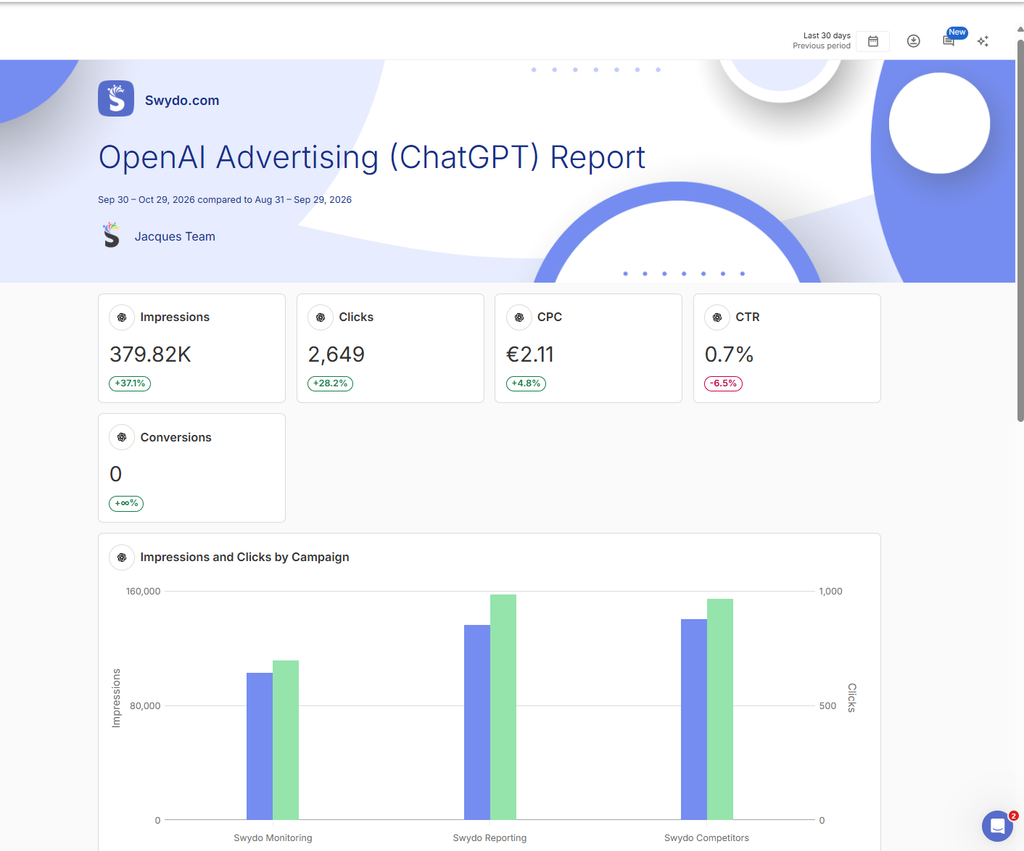
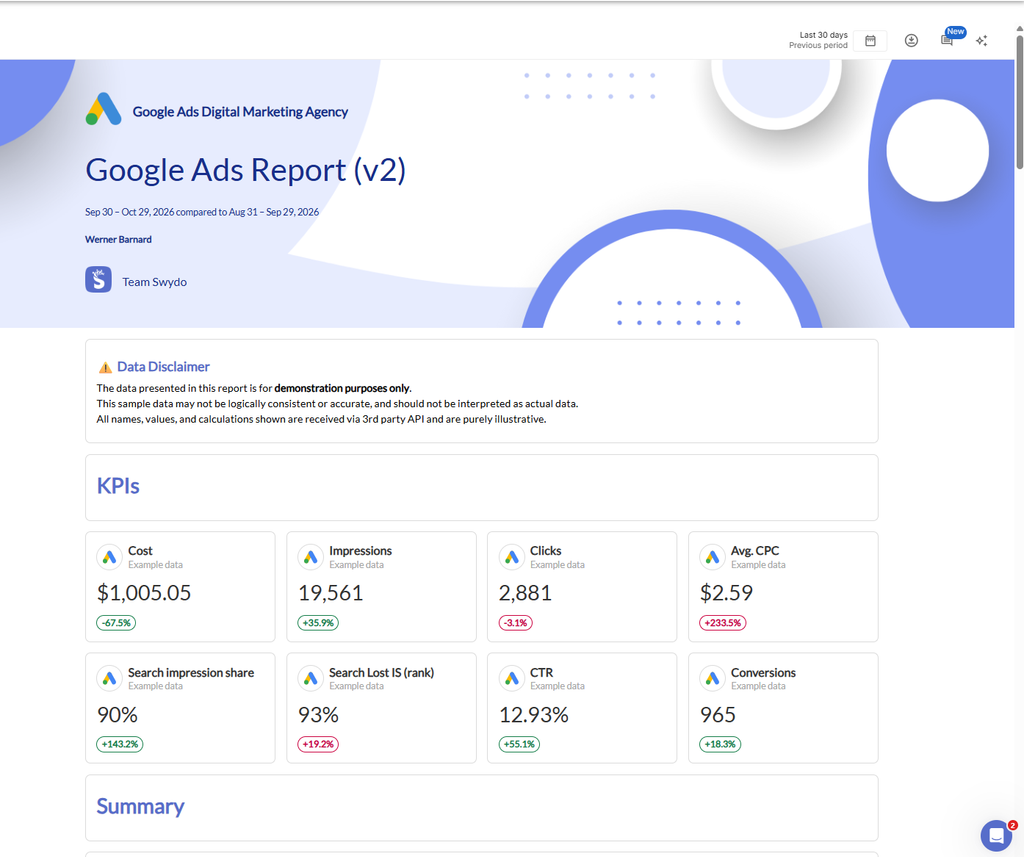
Swydo connects natively to ChatGPT Ads (OpenAI Advertising), so ChatGPT data lands in the same reports and dashboards as Google Ads, Meta Ads, LinkedIn Ads, and Microsoft Ads. You get campaign, ad group, and ad-level performance with impressions, clicks, cost, CPC, CTR, and CPM, plus ad previews so clients see the actual creative next to its numbers.
Setup takes a few minutes. Open Data Sources in the client, add OpenAI Advertising, and paste an API key from your OpenAI account. Then start from the ready-made ChatGPT Ads report template instead of building widgets from scratch. If you already handle Google Ads reporting for agencies, this is the same report with one more section.
Put Conversions Beside Spend With GA4
Ad platform numbers tell you what you paid. GA4 tells you what you got. Add a GA4 widget to the ChatGPT section of the report, filtered to the custom channel group you created for AI ads. You’ll see sessions and key events from ChatGPT clicks right under the ChatGPT spend. Do the same for Google. Both channels are judged on one conversion definition instead of two platforms grading their own homework.
| Channel Group | Sessions | Key Events | |||
|---|---|---|---|---|---|
| Paid Search | 2,450 | 78 | |||
| |||||
| Organic Search | 1,890 | 42 | |||
Keep the Test on Track With Goals and Alerts
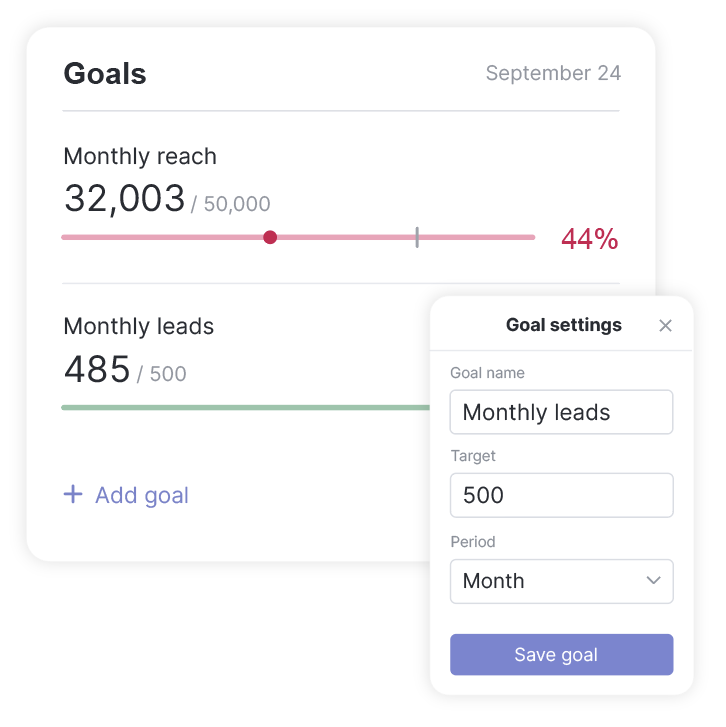
A test with a fixed budget needs pacing. Open Monitoring → Goals → +New Goal, pick the client and the ChatGPT Ads data source, and set a spend target for the test period. The goal shows On Track or Off Track as the month moves. You’ll know early if the 2x daily overspend rule is eating your budget.
Then add an alert for cost per click under Monitoring → Alerts, with notifications by email or Slack. If CPCs jump after a bid change, you hear about it the next morning, not at month-end. And if the API key behind the connection stops working, the Data Health Check flags it before your next scheduled report goes out with gaps.
Send the Weekly Update Without Writing It
Schedule the report to go out weekly during the test, and drop an AI summary block into the email (open the email editor, click +, then choose AI summary). Each send then opens with a short written recap of how ChatGPT and Google performed, which is usually the part clients read first. How much time would that save across every client running a ChatGPT test?
Mistakes to Avoid When Running ChatGPT Ads Alongside Google
Most of these come from treating ChatGPT like another Google campaign, which is a different problem from the usual Google Ads mistakes. A few come from features that behave differently than marketers expect.
Planning and Budget Mistakes
- Don’t judge ChatGPT by Google’s click-through rate. A 0.7% CTR isn’t failure in a channel where the answer appears before the ad. Judge cost per qualified lead or sale instead.
- Don’t run a test too small to mean anything. The $25 daily minimum gets you into the auction, not to a conclusion. Use the sizing formula above.
- Don’t pull money from proven Google campaigns. Fund the test from new budget or your weakest campaigns so reliable revenue stays protected.
- Don’t expect to reach every ChatGPT user. Paid subscribers and business accounts never see ads, which shrinks your audience more than the 1.2 billion weekly user figure suggests.
Setup and Control Mistakes
- Don’t write context hints like keyword lists. Short, comma-separated phrases give the system little to match on. Describe real conversations.
- Turn off creative enhancements in sensitive accounts. Automatic rewriting and translation can produce copy your legal or brand team never approved.
- Skip lifetime budgets. Advertisers in r/PPC threads compiled by Sprites report uneven pacing with lifetime budgets and some leads arriving from outside their target countries. Daily budgets and tight location settings help.
- Don’t count on blocking bad traffic. There are no negative keywords. If a context hint pulls in the wrong conversations, your only fix is to rewrite or remove it.
Measurement Mistakes
- Get tracking working before launch. Conversion bidding can’t learn from data it never receives.
- Never add up conversions from both platforms. Each platform counts every customer it touched, so the totals overlap.
- Keep view-through out of your conversion count. Treat it as a separate signal.
- Check your Google AI Overview exposure. You may already be paying for clicks inside AI answers through broad match, AI Max, Shopping, or Performance Max without seeing them broken out.
Paid ChatGPT Ads vs Organic Visibility in AI Answers
A sponsored card and a recommendation inside ChatGPT’s answer are two separate things, and confusing them leads to bad decisions. OpenAI states that ads don’t influence ChatGPT’s responses. Ads won’t make ChatGPT recommend you, and skipping them won’t hurt your chances.
That creates an interesting split. When someone asks “what’s the best project management tool for a small agency,” the answer itself might name three competitors while your ad sits underneath. The ad gets you saw, but the answer carries the trust. If you’re only in the ad slot, you’re the sponsor next to the recommendation, not the recommendation.
Organic visibility in AI answers comes from the same things that build authority elsewhere: clear, well-structured content that directly answers buyer questions, credible third-party reviews and mentions, and accurate information about your product across the web. This practice is often called generative engine optimization (GEO) or answer engine optimization (AEO).
The strongest position combines both, the same way SEO vs PPC was never really an either-or choice. Use organic content to earn the mention in the answer, and use ads to stay visible in conversations where you aren’t mentioned yet. As a bonus, the context hints that convert in your ad campaigns tell you which questions deserve better organic content.
Will ChatGPT Ads Replace Google Ads?
Not anytime soon, and the money shows why. ChatGPT Ads is growing fast from a standing start, while Google’s search business keeps growing from an enormous base.
On the OpenAI side, the company announced its ad business had reached a $1 billion annualized run rate in under 200 days. That’s unusual for a new platform. Yet Google Search and YouTube ads alone generated $261 billion in 2025, as PPC Land noted, and Alphabet reported Search revenue still growing 17% year over year in its second-quarter earnings release.
Forecasters point the same way. EMARKETER projects U.S. AI chatbot ad spending will jump 1,641% this year to $0.96 billion, while ads placed alongside AI search summaries such as Google’s AI Overviews will grow 152% to $26.42 billion. In its US AI Advertising Forecast, EMARKETER expects more than 80% of AI ad spending to appear next to AI content, mostly on Google, rather than inside standalone chatbots.
The more useful way to think about it: AI isn’t replacing search advertising, it’s changing where search ads appear. Google captures most of that shift through its own AI features, and ChatGPT becomes an additional channel for reaching people in research mode. Budgets will spread across both, with Google keeping the larger share for the foreseeable future.
Where to Put Your Next Advertising Dollar
Google Ads still earns the bigger share of most budgets. It reaches people at the moment they’re ready to act. It gives you the control and data to prove it worked.
ChatGPT Ads earns a test when your buyers research before they buy and you can fund enough clicks to get a real answer. Size the test from the conversions you need, track it in GA4 alongside Google, and run a holdout before you scale. Do that, and in 90 days you’ll know whether ChatGPT belongs in your plan, instead of guessing.
ChatGPT Ads vs Google Ads FAQ
Direct answers to the most common AI advertising questions
How much does it cost to advertise on ChatGPT?
ChatGPT runs on a live auction, so prices fluctuate. OpenAI currently recommends a starting bid of $3 to $5 per click. However, early advertiser tests show actual clicks can range anywhere from $3 to $9 depending on the niche.
Are ChatGPT ads cheaper than Google Ads?
Not necessarily. While a ChatGPT click might look cheaper on paper, Google captures users with immediate buying intent. This often makes Google Ads yield a faster, more predictable cost-per-lead, whereas ChatGPT captures users earlier in the research phase.
Is there a minimum spend for ChatGPT Ads?
Yes. While there is no account-level minimum, each individual U.S. campaign requires a daily budget of at least $25. Keep in mind that the system can spend up to twice your daily budget on busy days.
Do I pay for clicks or impressions on ChatGPT?
You can choose. You can pay per click (CPC), pay per thousand views (CPM) for brand awareness, or let the system optimize for conversions (though you are still billed per click in this model).
Can I target exact keywords in ChatGPT Ads?
No. Instead of keywords, you use “context hints”—short descriptive phrases detailing the type of conversations you want your ad to appear in (e.g., “comparing family SUVs”). There are currently no negative keywords to block specific terms.
Can I target competitors on ChatGPT?
Yes, indirectly. You can include competitor names in your context hints (e.g., “alternatives to [Competitor Name]”). The AI interprets the context of the user’s comparison and may display your ad, but it is not a strict 1-to-1 keyword match like Google.
Can I target local customers on ChatGPT?
Yes. You can narrow your audience targeting down to specific postal codes, making ChatGPT Ads a viable test for local home service businesses and real estate.
Who actually sees ads on ChatGPT?
Only adult users on the Free and Go plans see ads. Users paying for Plus, Pro, Business, or Enterprise plans have a completely ad-free experience.
What do ChatGPT ads actually look like?
They appear as a dedicated, clearly labeled “Sponsored” card at the very bottom of the AI’s response. The card features your business name, logo, a headline, a short description, an optional image, and a clickable link.
Will my ad change ChatGPT’s organic answer?
No. OpenAI maintains a strict firewall between paid ads and organic AI responses. Buying an ad will not make ChatGPT recommend your product in its generated text. Being recommended organically depends entirely on your broader SEO visibility.
Where do Google AI Overview ads appear?
Google’s AI ads can appear above, below, or directly inside the AI-generated summary on the search results page. You don’t create a separate campaign for this; they are pulled automatically from your existing Search, Shopping, or Performance Max campaigns.
Should B2B companies use ChatGPT Ads?
Proceed with caution. Because ads are only shown to free users, you are likely missing your core demographic. Many B2B decision-makers use paid company ChatGPT plans (Team/Enterprise), which are entirely ad-free.
How do you track conversions on ChatGPT?
You install OpenAI’s Measurement Pixel on your website or use their Conversions API for server-side tracking. Always append UTM parameters to your destination links so you can track the exact session behavior in Google Analytics 4 (GA4).
How long does it take to see results from ChatGPT ads?
Plan for a 90-day test. Spend the first 30 days generating traffic to see if your context hints work, the next 30 days optimizing for actual conversions, and the final 30 days running a holdout test to compare the true ROI against Google Ads.
How do I report ChatGPT and Google Ads together?
Use a third-party reporting tool like Swydo that integrates with both APIs natively. This allows you to stack ChatGPT impressions, CTR, and CPC side-by-side with your Google Search metrics in a single, automated client dashboard.
Put ChatGPT Ads and Google Ads in the same client report and see which one actually earns its budget.
Start Your Free Trial Today