
AI search visibility is how often your client’s brand shows up in answers from Google AI Overviews, ChatGPT, Perplexity, and Gemini. Tracking it well means watching three signals together (presence, coverage, and drift) and reporting them in the same cadence as your paid and organic numbers.
Most agencies are getting asked about AI search by clients right now. Most of the answers being given are wrong at the methodology level: single-platform rank trackers, one-shot snapshots, position scores that change every time you run the prompt. Your clients deserve a clearer report than that. So does your retainer.
This is the workflow we use, and the one we’d give any agency operator who’s been asked “where do we show up in ChatGPT?” twice in the same week.
What Is AI Search Visibility
AI search visibility is the share of relevant AI-generated answers in which your client’s brand, website, or content appears. It’s the rough equivalent of organic search visibility, but for answer engines instead of ten blue links.
Think of it this way. Traditional SEO measures how often your storefront shows up on the map. AI search visibility measures how often someone asks a knowledgeable friend “where should I go for X?” and your client’s name comes out of the friend’s mouth. The first is countable because the map has a fixed format. The second is harder because the answer changes a little every time the conversation happens.
That last point is the whole problem. Two minutes ago, the same prompt to the same engine gave a different answer. Probably a slightly different list of brands. Maybe a different order. A reporting workflow that pretends otherwise is selling you certainty in a probabilistic system.
A workable definition keeps three things in mind:
- It’s a frequency metric, not a position metric. “Appeared in 47% of runs” is a real number. “Ranked #3” is a single sample of a moving distribution.
- It depends on the engine and the query. ChatGPT, Google AI Overviews, and Perplexity pull from different source pools and surface them differently. There’s no universal “AI rank.”
- It’s category-shaped. A health brand and an e-commerce brand will see completely different AI search behavior. Benchmark against your client’s category, not against an industry average.
Why AI Search Visibility Matters Now
AI search visibility matters because it’s the channel quietly shaping consideration before the click happens. The traffic share is still small, but the influence isn’t, and the clients asking you about it want a defensible answer.
Conductor’s 2026 AEO/GEO Benchmarks Report, which analyzed 3.3 billion sessions across 13,770 enterprise domains, found that AI referral traffic accounts for 1.08% of all website traffic on average. The IT sector tops out at 2.8%; healthcare sits at 0.64%. So this isn’t yet a primary acquisition channel for most businesses, and it probably won’t be in the next twelve months either.
Conductor 2026 AEO/GEO Benchmarks
AI referrals as a share of all web traffic — by industry
Aggregated across 13,770 enterprise domains and 3.3 billion sessions, May–September 2025.
IT sector Highest
All-industry average
Healthcare Lowest
Source · Conductor 2026 AEO/GEO Benchmarks Report
But the influence layer is real and growing:
- AI Overviews appear on a meaningful share of commercial-intent queries in many verticals, especially health, finance, and B2B SaaS.
- Buyers research a product with ChatGPT or Gemini, form a shortlist there, and then come to the website via search or direct.
- The brands named in those AI answers earn what amounts to a free recommendation from a system the buyer already trusts.
If your client is in their AI-named shortlist, they win deals they never see a referral source for. If they’re not, they lose deals they never see a refused inquiry for. That’s why reporting on this matters even at 1% traffic share.
There’s a second reason worth naming. Your competitors are charging clients $20,000–$50,000 for “GEO transformation” engagements right now. A clear, honest, monthly view of your client’s actual AI search presence is the cheapest possible inoculation against your client buying that service from someone else.
Why the Standard AI Rank Tracker Approach Is Broken
The standard approach (ask the AI engine where your client ranks for a list of keywords, log the position, report it weekly) fails on two grounds that aren’t going away.
The first ground is reproducibility. Run the exact same prompt to the same engine on the same day, and the answer changes. SparkToro and Gumshoe.ai tested this directly with 600 volunteers running 12 identical prompts 2,961 times. The probability of getting the same brand list twice was under 1%. The probability of getting the same list in the same order was under 0.1%.
SparkToro × Gumshoe.ai · Largest public reproducibility study
Same prompt. Same model. Same day. Different answer.
12 identical prompts were run 2,961 times across ChatGPT, Claude, and Google AI by 600 volunteers. The list of brands recommended was almost never the same twice — and almost never in the same order.
<1%
probability that two runs of the same prompt return the same brand list on the same day. The same list in the same order? Under 0.1%.
600
Volunteers
recruited Nov–Dec 2025
12
Identical prompts
tested across volunteers
2,961
Total runs
across 3 AI engines
Source · SparkToro / Gumshoe.ai · Search Engine Land
The second ground is volatility week over week. Sistrix tracked 82,619 prompts across 17 weeks and six countries. ChatGPT rotated 74% of its cited domains every week. Google AI Mode rotated 56%. AI Overviews were stable at 5%, but only in aggregate — at the per-query level, even AI Overviews shift constantly. If your tracker reports a single rank number without showing the variance across runs, it’s reporting a screenshot of a process, not a position.
Sistrix · 82,619 prompts × 17 weeks × 6 countries
How much do AI engines rotate their cited domains each week?
% of cited domains that change week-over-week. Below 10% = stable. Above 50% = a tracker reading a single rank is reading a coin flip.
% of domains rotating weekly
ChatGPT
Most volatile
Google AI Mode
Highly volatile
AI Overviews
Aggregate stable
What this means for client reporting: any tracker that shows a single “rank in ChatGPT” without the variance across runs is reporting a screenshot of a moving process. The right unit isn’t position — it’s frequency of appearance across many runs.
Source · Sistrix Citation Drift Study
Both findings point the same direction. The unit of measurement for AI search visibility can’t be position. It has to be frequency of appearance across many runs. The reporting question changes from “where do we rank?” to “in what share of relevant AI responses do we appear?”
That’s the foundation of the framework below.
The Presence-Coverage-Drift Method
The Presence-Coverage-Drift Method is a three-signal model for tracking AI search visibility that survives the reproducibility problem because it measures frequency, not position. The three signals are presence (does an AI Overview appear at all?), coverage (which of your client’s keywords trigger it?), and drift (how do those numbers move week over week?).
The Method
Three signals that survive AI’s reproducibility problem
SIGNAL 01
Presence
“How often does Google bother to show an AI Overview at all when someone searches in our category?”
SIGNAL 02
Coverage
“Of the keywords that do trigger AI Overviews, which ones are they?”
SIGNAL 03
Drift
“How quickly are presence and coverage changing week over week?”
Each signal answers a different question your client will eventually ask.
- Presence answers: “How often does Google bother to show an AI Overview at all when someone searches for things in our category?” This is the foundation. If only 8% of your client’s tracked keywords trigger an AI Overview, you don’t have an AI Overview problem yet. You have a “wait and watch” situation. Don’t oversell it.
- Coverage answers: “Of the keywords that do trigger AI Overviews, which ones are they?” This is where the actionable work lives. A client whose informational keywords trigger AI Overviews but whose commercial keywords don’t has a different optimization roadmap than the opposite. Coverage tells you which content pillars are inside the AI conversation and which aren’t.
- Drift answers: “How quickly are presence and coverage changing?” Because per-query stability is so low, the only honest read on an AI search trend is the slope of the line over time, not the point reading. Weekly drift in either direction matters more than the absolute number on any single day.
A client report that hits all three of these will outperform the “we rank #3 in ChatGPT” tracker on day one, because the three together are defensible and the position number isn’t.
What You’ll Need
You need three things to set this up: a search platform that exposes AI Overview keyword data, a place to pull that data into a client-shaped view, and a way to deliver the report on a schedule the client trusts.
The free-or-included pieces first:
- Semrush, AccuRanker, or SE Ranking: your SEO platform that’s already tracking the client’s keyword rankings. For Presence and Coverage signals specifically, you need a tracker that exposes AI Overview metrics at the keyword level. Semrush has the most-developed feed for this today.
- Google Search Console: for the organic baseline and for context when AI Overviews are eating into clicks.
- Google Analytics 4: to track AI traffic in GA4 and connect AI visibility back to actual sessions.
Then a reporting layer that ties them together into one client-facing view. We use Swydo for this. Every Swydo plan starts with a 14-day free trial (no credit card), includes 10 data sources in the base tier, and gives you unlimited seats so the rest of the agency can pile in without per-seat upgrade pressure. That last part matters more than it sounds when you’re rolling a new workflow out to a team of fifteen.
You don’t need a separate “AI tracking tool” on top of these. The job is data plumbing and presentation. Pick the tools that already work in your stack and have them talk to each other.
How to Track AI Search Visibility for Clients
1. Pick the Right Keywords for the Client’s Category
Skip this step and the rest of the report is noise. The Presence signal especially depends on tracking keywords that are realistic candidates for triggering AI Overviews, not keywords you picked because they were easy to rank for.
A workable selection looks like:
- 15–30 informational keywords (“how does X work”, “what is Y”, “best Z for Q”). These are the most likely AI Overview triggers in most categories.
- 10–20 commercial-intent keywords (“X vs Y”, “best X for [use case]”, “top X reviews”). AI Overview rates are lower here, but the influence on revenue per appearance is much higher.
- 5–10 branded keywords (your client’s name, plus your client’s main competitors). These help you see whether the AI is associating your client with the right context.
The keyword list lives where you already keep SEO tracking: your Semrush project, AccuRanker, or SE Ranking workspace. The tracker doesn’t have to change. What changes is which fields you pull into the client report next.
Step 1 · Keyword selection
Recommended tracking mix for AI search visibility
Build the list around realistic AI Overview candidates, not just keywords that were easy to rank for.
Informational
“how does X work” · “what is Y” · “best Z for Q” — your most likely AIO triggers
15–30
keywords
Commercial intent
“X vs Y” · “best X for [use case]” · “top X reviews” — lower trigger rate, higher revenue impact
10–20
keywords
Branded
Client name + main competitors — confirms AI is associating the brand with the right context
5–10
keywords
Total tracked keywords
30–60
Sidenote. If the client doesn’t have a tracked-keyword list yet, build one before you start reporting on AI search visibility. You can’t report a frequency metric over a moving keyword set.
2. Connect the AI Overview Data Source
The Semrush integration in Swydo exposes two fields that matter for this report: AI Overview, which counts the keywords from the Domain Overview report triggering an AI Overview presence, and AI Overview Keyword Triggered, which lists the exact keywords in the Organic Research report that triggered an AI Overview placement. The two are different shapes of the same question — Presence at the domain level and Coverage at the keyword level.
To bring them into a client report:
- Open the Connections page and connect the client’s Semrush account at the account level.
- Inside the data source, open Advanced Settings and enable the AI Ranking fields. Both AI Overview metrics live there.
- Save the source. You’re ready to use the fields in widgets.
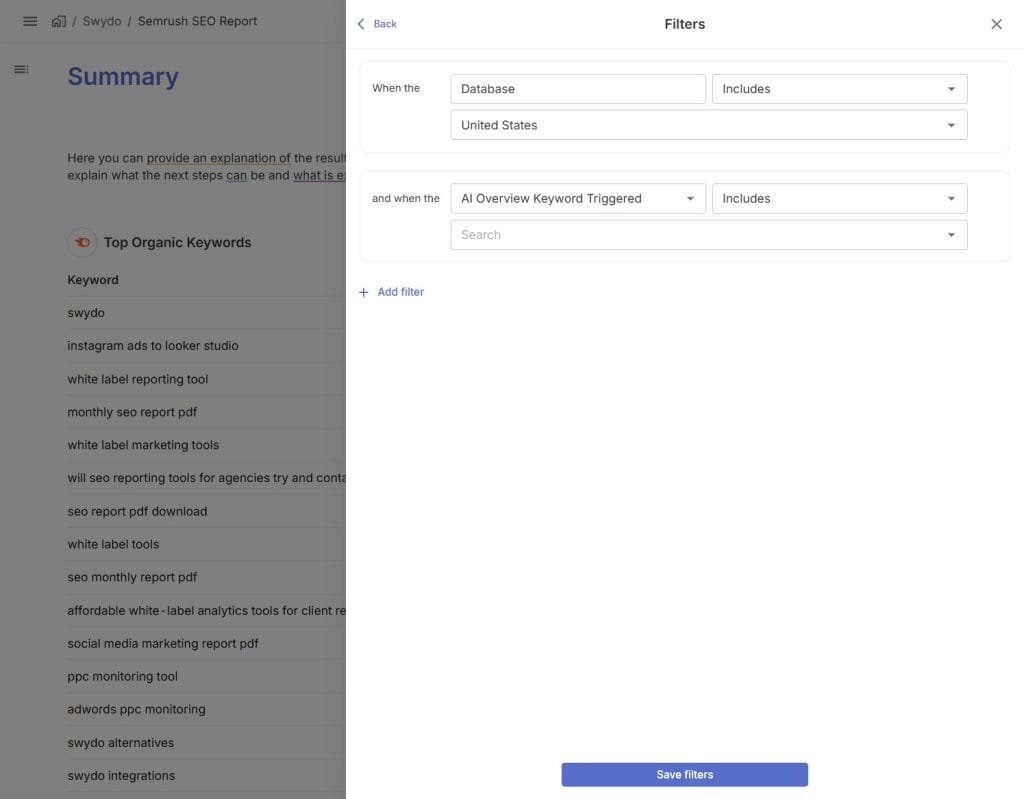
If your tracker isn’t Semrush, the mechanic is similar but the field names differ. The same source needs to expose AI Overview keyword counts and the keyword list. If it doesn’t, switch trackers for this part of the workflow. There’s no clean substitute.
3. Build the AI Visibility Section in the Client Report
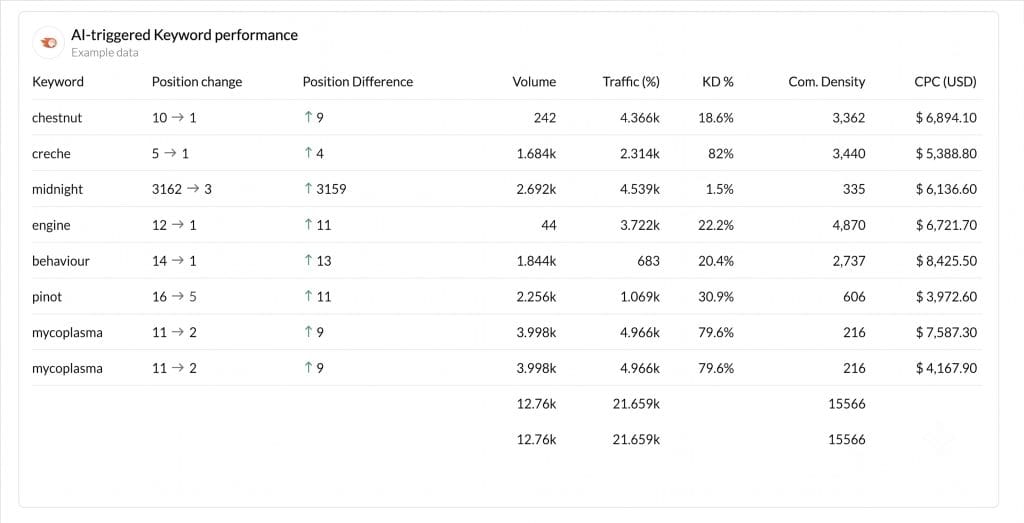
Add a dedicated AI Visibility section to the client’s monthly report. The same client reporting best practices apply: one topic per section, plain section names, charts before tables. Three widgets cover the framework’s three signals.
The widget recipe:
| Signal | Widget type | Metric | Comparison |
|---|---|---|---|
| Presence | KPI scorecard | Count of keywords triggering AI Overview | This month vs last month |
| Coverage | Table | Top keywords + AI Overview Triggered + organic position | Filter to “AI Overview = Yes” |
| Drift | Line chart | Weekly AI Overview keyword count over the past 12 weeks | Period-over-period |
Open Reports → the client’s report → add a new Section called “AI Search Visibility.” Drop the three widgets in order, top to bottom: KPI scorecard first (Presence), Table second (Coverage), Line chart third (Drift). Add a Text widget above the section as a one-line plain-English caption, something like “How often Google AI Overviews show up in our tracked keywords, which ones, and how that’s changing over time.”
4. Set Up Drift Alerts for the Unexpected
Drift alerts are the layer that catches large week-over-week changes before the client emails you about them. Set them up once, and the reporting flow handles itself.
Open Monitoring → Alerts → +New Alert. Pick the client, then the Semrush AI Overview keyword count metric. Set a trigger window of 7 days and a change threshold of 20%. That’s roughly the line where a real category shift starts to separate from the day-to-day per-query churn. Add the alert to Slack and to the email address of whoever owns the account.
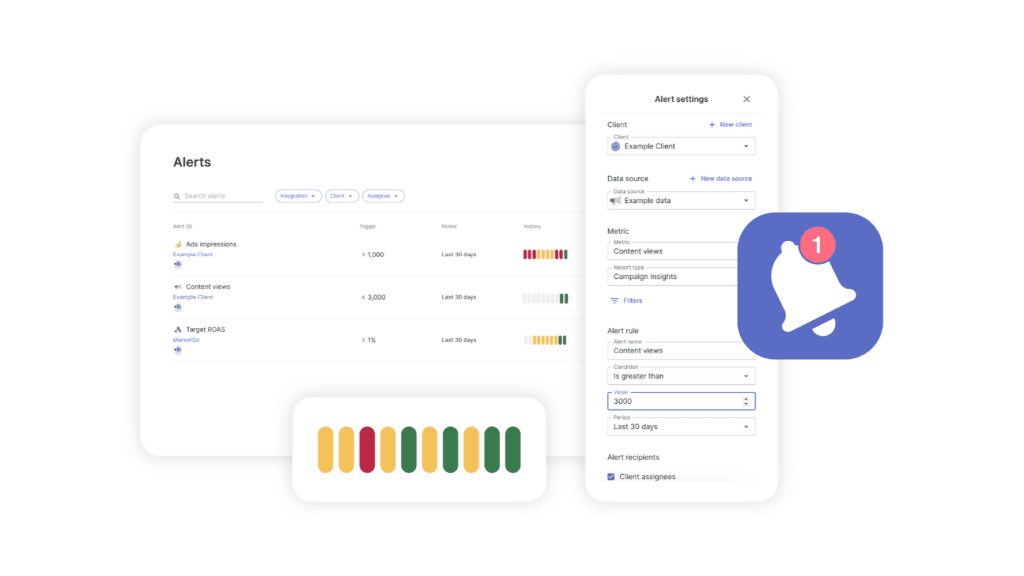
The pattern translates from any existing SEO alert tools setup: same trigger logic, just trained on AI Overview metrics instead of organic position.
Two alerts per client is usually enough: one on the upside (so you can move on it positively in the next client call) and one on the downside (so you can investigate before the client notices). More than that, and you’re just generating noise in your own Slack.
Sidenote. Don’t alert on lagging metrics. Cost moves slowly; CPC drifts faster; AI Overview presence shifts faster than either. Match the alert’s trigger window to the speed of the underlying metric, not to a default monthly cadence.
5. Add the Drift Commentary Layer
The Presence and Coverage numbers are factual. The Drift signal needs human commentary to be useful in a client call. Without it, a 28% week-over-week drop reads as a five-alarm fire when it’s actually category-wide volatility everyone else is also experiencing.
Add Swydo AI summaries to the scheduled report email so the client gets a one-paragraph human-style read on what’s moving in their AI visibility section, automatically attached to the monthly send. The default prompts handle Wins, Issues, and Recommendations; for AI visibility specifically, the Recommendations prompt does the most useful work because it ties the drift to a category context.
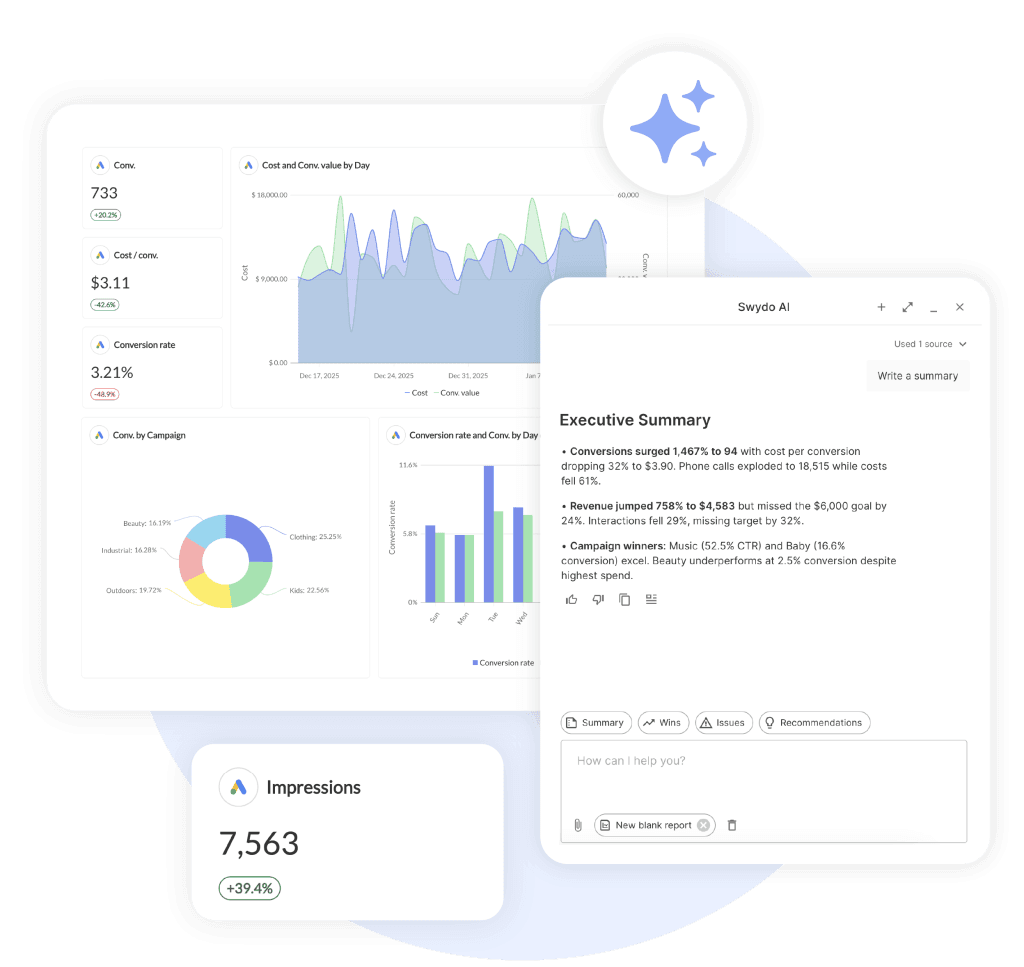
You’ll still edit the AI summary before it goes out. Treat it as a draft for the analyst, not a final report. The point isn’t to remove the analyst from the loop. It’s to give the analyst a starting paragraph instead of a blank field.
If you want a stronger human touch, write the commentary in a Text widget directly inside the report. The advantage there is that the commentary lives in the report itself rather than only in the email, which matters if your clients open the live dashboard between scheduled sends.
6. Share the Live Dashboard With the Client
Don’t make the client wait for a monthly PDF to see this data. The dashboards vs reports tradeoff goes one direction here — AI visibility moves fast enough that point-in-time reporting is half-useful at best, and clients who get asked about AI search by their CEO will want to look at the dashboard the same day.
Share the report as a live dashboard from Reports → Share → Generate Link. Password-protect it so the client can’t accidentally leak the URL. Set the dashboard’s default view to open on the AI Visibility section so the new metrics are the first thing the client sees on their next visit.
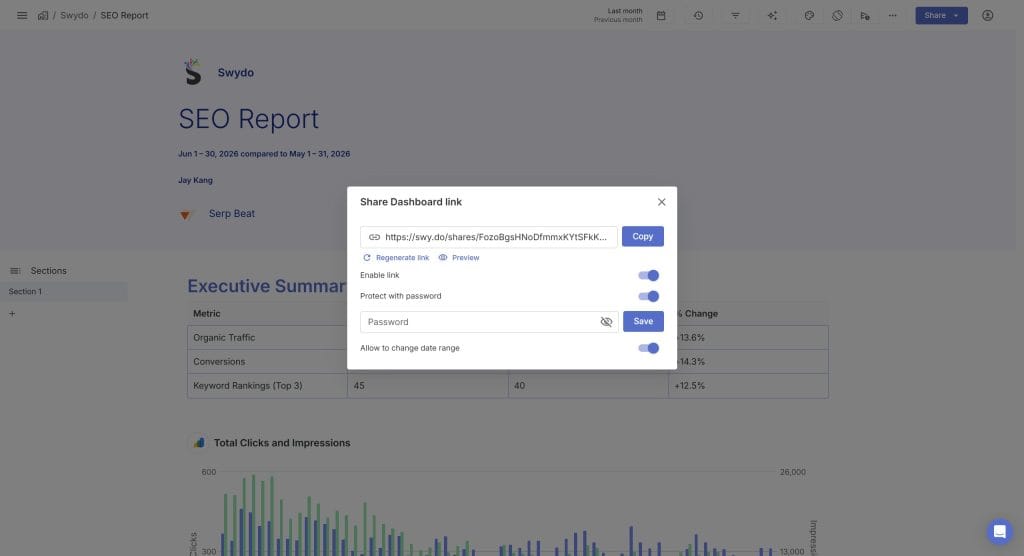
The Brand Templates layer handles the white-label piece: your agency’s fonts, logo, and accent colors apply to the dashboard the client sees, so the AI visibility section reads as your agency’s reporting product, not as a third-party tool.
Is It Really That Simple?
The mechanical part is.
Pick the keywords, connect the source, build three widgets, set two alerts, schedule the send. That’s a half-day of work for the first client and forty minutes per additional client after you’ve built a Report Template you can clone.
The interpretation part is harder, and this is where most agencies will lose ground over the next twelve months.
The risk is reading too much into any single week’s data. Presence numbers can swing meaningfully week over week in many categories without anyone doing anything different. That’s the underlying volatility of AI Overview rendering, not a client-side problem. The temptation will be to spin up “AI optimization sprints” every time the line dips. Resist that. Most of those sprints will end three months later with the line back where it started for reasons unrelated to anything anyone did. You’ll have spent client hours on motion, not progress.
The opposite risk is undersell. If the trend genuinely is moving against your client over an 8–12 week window, the data here will show it before any traffic-side metric does. Catch the trend at the trend level and you’ll get more strategy budget. Miss it because you reported the per-week noise and the client tuned out, and you’ll lose the room when it matters.
A second honest point.
The Semrush AI Overview metrics are specifically about Google AI Overviews. ChatGPT, Perplexity, and Gemini visibility are measured differently, most rigorously via direct prompt testing through services like Profound or Brand Radar by Ahrefs, plus manual category audits. Don’t tell your client this report covers “all AI search” when it covers Google AI Overviews specifically. The half-truth will catch up with you when the client’s own CEO runs a ChatGPT prompt and sees the brand isn’t there. Be precise about what’s in scope and what isn’t, and add a manual audit pass for the other engines once a quarter.
Third.
The whole framework rests on the keywords you picked in step one. If the keyword list drifts (the agency adds and removes terms quarterly without resetting the baseline), the Presence and Coverage numbers will move for reasons that have nothing to do with the client’s actual AI visibility. Lock the keyword list down for at least 90 days at a time, and document changes when you make them.
What’s your client’s biggest AI search question right now, and is the report you’re sending answering it, or are you sending them numbers they have to translate themselves?
Final Thoughts
AI search visibility reporting earns its place when it survives a real client question on a real Tuesday morning. The Presence-Coverage-Drift method does that because it measures frequency over time instead of pretending to measure position at a moment.
Three things to take from this:
- Track presence, coverage, and drift together. The three signals are weak alone and strong as a set.
- Report frequency, not rank. Position numbers don’t survive contact with how AI engines actually generate answers.
- Lock the keyword list, alert on drift, write the commentary by hand.
The clients who’ll ask hardest about AI search are the same clients who’ll spot a vendor selling them snake oil. Give them the honest report first, and you’ll be the one they call when the bigger question lands.
AI Search Visibility FAQ
Direct answers to the questions clients, search engines, and AI chats are asking
AI search visibility is the share of relevant AI-generated answers in which a brand, website, or piece of content appears across answer engines like Google AI Overviews, ChatGPT, Perplexity, and Gemini. It’s a frequency metric, not a position metric — the right question is “in what percentage of relevant AI responses does the brand show up?” not “where does it rank?”
All three describe the same shift but emphasize different parts of it. AI search visibility is the measurement layer — how often a brand appears in AI answers. AEO (Answer Engine Optimization) is the strategic discipline of getting brands into those answers, similar to how SEO is the discipline behind search rankings. GEO (Generative Engine Optimization) is the more recent term for the same work, used more often when the focus is generative AI tools like ChatGPT and Perplexity rather than Google’s AI Overviews. In practice, the terms are used interchangeably.
Yes, but for influence rather than direct traffic. Conductor’s AEO/GEO Benchmarks Report found AI referral traffic averages roughly 1% of total web traffic across 3.3 billion sessions and 13,770 enterprise domains. The traffic share is small, but buyers form shortlists inside ChatGPT and Gemini before they ever click — so being named in the AI’s answer wins deals that never show up as a referral source. The influence runs ahead of the clicks.
A mention is when the AI names a brand inside the answer text. A citation is when the AI links back to a specific page on the brand’s site as a source. Mentions build brand awareness. Citations can drive referral clicks and signal that the AI trusts the content enough to use it as a source. Strong AI visibility usually requires both, and most serious tracking tools report on each separately.
Traditional Google search returns ten ranked links and lets the user choose. AI search returns one synthesized answer that already chose. That changes three things for marketers: there’s no fixed “rank” because the answer is generated fresh each time, the same prompt can produce a different brand list on the next run, and a meaningful share of queries now end without a click because the answer was given directly in the response.
AI models are non-deterministic by design — they sample from probability distributions rather than returning a fixed lookup. SparkToro and Gumshoe.ai tested 12 identical prompts run 2,961 times across ChatGPT, Claude, and Google AI by 600 volunteers. The probability of getting the same brand list twice was under 1%. Same list in the same order? Under 0.1%. This is how the systems are supposed to work, not a bug — and it’s why frequency over many runs is the only reliable measurement unit.
Run a manual audit first. List 15–20 prompts a real buyer would ask in the brand’s category — “best [product] for [use case],” “what’s the top tool for [job to be done],” “alternatives to [competitor].” Run each prompt 3–5 times in ChatGPT, Perplexity, and Gemini, and check Google for AI Overviews on the same queries. Log which brands appear and which sources get cited. Anything more rigorous than that needs a dedicated tracking tool, but the manual audit will tell you within an hour whether AI visibility is a real issue for the brand.
The right tool depends on which AI surfaces matter most. Semrush, SE Ranking, and AccuRanker have built AI Overview tracking on top of their SEO platforms — best when keyword-level Google AI Overview data is the priority. Profound and Brand Radar by Ahrefs run direct prompts against ChatGPT, Perplexity, and Gemini, surfacing mentions and citations across those engines. Most agencies end up using one of each: a keyword-based tracker for Google AI Overviews and a prompt-based tool for the generative AI engines.
Weekly for the data, monthly for the report, quarterly for strategic decisions. Per-query volatility is too high to make daily checks useful — they generate noise, not signal. Weekly data collection captures the trend without overreacting to single-prompt swings. Monthly reporting gives the client a digestible read. Quarterly is the right cadence for strategy changes, because anything shorter than 8–12 weeks isn’t long enough to separate a real trend from category-wide volatility.
For Google AI Overviews, track 30–60 keywords split across three intent buckets: 15–30 informational (“how does X work,” “what is Y”), 10–20 commercial (“X vs Y,” “best X for [use case]”), and 5–10 branded (the client’s name plus main competitors). For prompt-based tracking on ChatGPT and Perplexity, 20–40 prompts is usually enough — fewer than keywords because each prompt needs to be run multiple times to average out the noise. Lock the list for at least 90 days so the baseline doesn’t drift underneath the report.
Mostly informational and question-shaped queries. Ahrefs research found that around 99% of keywords triggering AI Overviews are informational in intent — “how to,” “what is,” “why does,” “best way to.” Commercial queries trigger them at much lower rates, and pure transactional queries (“buy [product]”) almost never do. AI Overview trigger rates also vary by vertical: healthcare and B2B SaaS sit at the high end, e-commerce at the low end. The implication for keyword selection is to weight the tracked list toward informational and comparison queries, which is where AI Overviews are doing real work.
Partially. Free options include manual prompt testing in ChatGPT, Perplexity, and Gemini, monitoring Google AI Overviews for tracked queries by hand, and using Google Search Console to spot CTR drops on AI-eligible keywords (impressions stable, clicks falling = likely AI Overview interception). For anything systematic — automated tracking across dozens of keywords, drift alerts, week-over-week comparisons — a paid SEO platform with AI Overview data or a dedicated AI visibility tool is required.
All four if the budget supports it; start with presence and share of voice if it doesn’t. Presence is the foundation — does the brand appear at all? Share of voice compares appearance frequency against named competitors and is the metric clients understand fastest. Citations track which pages on the site the AI is actually linking to. Sentiment captures the tone — whether the brand is described positively, neutrally, or negatively in the answer. Negative sentiment can suppress conversion even when visibility is high, so it’s worth monitoring once the basics are in place.
GA4 doesn’t have an “AI” channel out of the box — AI referrals usually land in “Unassigned” or “Referral.” To isolate them, open Reports → Acquisition → Traffic acquisition, click “Add filter,” set the dimension to Session source/medium with match type “matches regex,” and apply a regex filter that includes the major AI domains:
(chatgpt\.com|openai\.com|perplexity\.ai|claude\.ai|gemini\.google\.com|copilot\.microsoft\.com).*
For a permanent view, create a custom channel group in Admin → Channel groups so AI traffic appears as its own channel in every report going forward. Note that traffic from Google AI Overviews is not separable in GA4 — clicks from an AI Overview show up as google / organic just like any other Google click.
Yes, for many informational queries. Multiple studies have found that when an AI Overview appears, the click-through rate on the top organic result drops significantly — by as much as half on informational queries. The pages still rank, impressions still register in Search Console, but a meaningful share of users get their answer directly from the AI Overview and never click. The clicks that do happen tend to be higher-intent, since the user already saw a summary and chose to dig deeper anyway.
Look for the diagnostic pattern: stable average position, stable or rising impressions, falling CTR. In Google Search Console, filter to the affected keyword group and compare the last 90 days against the previous 90. If position hasn’t moved more than half a spot but CTR has dropped meaningfully, an AI Overview is the most likely cause. A keyword-level tracker that flags AI Overview presence (Semrush, Ahrefs, SE Ranking) will confirm it directly.
For most sites, yes. Visitors arriving from ChatGPT, Perplexity, or AI Overviews tend to have already seen a summary, considered alternatives, and decided the brand was worth a closer look — they’re further down the funnel than a typical organic visitor. Reported conversion rate multiples vary, but the pattern is consistent across studies: lower volume, higher intent. The practical implication is that AI traffic is worth measuring even when the raw click count looks small.
Not on a meaningful timeline. AI referral traffic is around 1% of total web traffic on average — large enough to matter for influence, far too small to call a replacement. The more accurate description is that Google is becoming an AI surface itself (via AI Overviews and AI Mode) while ChatGPT, Perplexity, and Gemini take a growing slice of the research and shortlist-formation step. The right planning posture is “both, and” rather than “either/or” for at least the next several years.
Yes — in GA4, open Traffic acquisition, click the “+” next to Session source/medium and add Landing page + query string as a secondary dimension, then filter by the AI tool’s domain. The result is a page-by-page view of which content is earning AI clicks. The pages that show up are often surprises — not always the highest organic performers, but the ones structured cleanly enough for an AI to use as a source. Those pages are worth treating as priority real estate: refresh them, add internal links, and make sure each has a clear next step for the higher-intent visitor.
Three core metrics, scaled to what the client cares about: Presence (count or percentage of tracked keywords triggering an AI Overview), Coverage (the actual keyword list that’s triggering one, with intent and current position), and Drift (the week-over-week movement in both). For clients tracking ChatGPT and Perplexity too, add a fourth: Share of Voice — how often the brand appears versus named competitors across the same prompts.
| Metric | Widget | Answers |
|---|---|---|
| Presence | KPI scorecard | Is AI search a factor in this category? |
| Coverage | Filtered table | Which content pillars are inside the AI conversation? |
| Drift | Line chart, 12 weeks | Is the trend moving with or against the brand? |
| Share of Voice | Bar chart vs. competitors | Where does the brand sit relative to peers? |
Because the underlying system doesn’t produce a stable rank. Sistrix tracked 82,619 prompts across 17 weeks and six countries: ChatGPT rotated 74% of its cited domains every week, Google AI Mode rotated 56%, AI Overviews rotated 5% in aggregate but far more at the per-query level. A single rank number is a screenshot of a moving process, and it implies a precision the data doesn’t support. Frequency over many runs — “appeared in X% of tracked responses” — is the only number that survives the next refresh.
20% week-over-week change on a 7-day window. That threshold is roughly where a real category shift starts to separate from the per-query churn that’s normal in AI search. Set two alerts per client — one upside, one downside — and resist the urge to add more. Extra alerts generate noise, not signal, and noise teaches the client to ignore the channel.
Use a concrete framing: “If I ask ChatGPT the same question twice in a row, the answer comes back slightly different both times. That’s how the technology works — not a bug. So instead of reporting a position that changes every time we check, we report how often your brand appears across many checks over time. The trend over 8–12 weeks tells us what’s really happening; any single week is mostly noise.” Most clients accept the reframe immediately once they understand the underlying mechanic.
Both, but separately. Google AI Overviews are best tracked via keyword-level data from an SEO platform — automated, repeatable, scales across many keywords. ChatGPT, Perplexity, and Gemini are best tracked via prompt-based tools or a quarterly manual audit. Don’t combine them into a single “AI visibility” score; the engines work differently, draw from different source pools, and respond to different optimization levers. Mixing them into one number hides the actionable detail.
About half a day for the first client — selecting keywords, connecting the data source, building the report widgets, configuring alerts, and writing the first round of commentary. After a template is in place, additional clients take roughly 40 minutes each: clone the template, swap the keyword list and account credentials, sanity-check the data. Ongoing maintenance runs 30–45 minutes per client per month, plus 1–2 hours quarterly for the manual audit of ChatGPT, Perplexity, and Gemini.
Six things move the needle, in rough order of impact: publish clear, well-structured content that directly answers the questions AI gets asked in the category; earn mentions on the third-party sites the AI engines already trust (industry roundups, comparison pages, expert lists); add structured data (FAQ, HowTo, Article schema) so the content is machine-readable; allow AI crawlers in robots.txt; collect substantive reviews on platforms the AI references; and join authentic conversations on Reddit, Quora, and industry forums where AI engines pick up brand signals. None of these are quick wins individually — together, over a quarter or two, they compound.
Content that’s easy for a model to extract a clean answer from. The pattern across cited pages is consistent: a clear question-shaped heading, a concise direct answer in the first 30–50 words below it, supporting detail in short paragraphs and bullets, and structured data backing it up. Long-form pages built around a single topic tend to outperform shorter pages that try to cover multiple topics — AI engines reward depth and coherence over keyword stuffing.
Yes — strong organic SEO is the foundation, not a substitute. Google AI Overviews pull heavily from pages already ranking on page one for the query. ChatGPT and Perplexity index much of the same web that Google does, so authority signals, technical health, and content quality carry over. The shift isn’t away from SEO; it’s adding answer-shaped content structure and AI-readable formatting on top of solid SEO fundamentals. Sites with weak SEO won’t suddenly win in AI search; sites with strong SEO that adapts to AI-friendly structure tend to win in both.
For most brands focused on visibility, allow them. Blocking AI crawlers (GPTBot, ClaudeBot, PerplexityBot, Google-Extended) prevents the corresponding engines from using the site as a source, which directly reduces the chance of being mentioned or cited in answers. Publishers protecting paywalled content or unique investigative work may have a defensible reason to block; most service businesses, e-commerce sites, and content sites benefit more from being inside the AI conversation than from staying out of it.
Plan on a quarter at minimum, with meaningful movement showing up across 8–12 weeks. AI engines refresh their training and indexing on different schedules, and most don’t surface new content as fast as Google does. Set the expectation with the client up front: technical changes (schema, crawl access) show up first; content changes show up next; mentions on third-party sites (the slowest lever) compound over two or three quarters. Anything promising faster than that is selling certainty the system doesn’t offer.
Usually not at the price points being quoted. Many of these engagements run $20,000–$50,000 and promise to move a single “AI rank” number — selling certainty in a system that’s fundamentally probabilistic. The honest alternative is a smaller, ongoing engagement: tighten the technical foundations the AI engines reward, publish answer-shaped content on the right questions, build mentions on trusted third-party sources, and measure with the Presence-Coverage-Drift framework month over month. Less dramatic, but it’s the work that actually moves the metric.
Reacting to per-week noise. AI visibility numbers swing meaningfully week to week for reasons that have nothing to do with anything the brand did. Spinning up an “AI optimization sprint” every time the line dips burns budget on motion instead of progress. The discipline is to look at the slope of the line over 8–12 weeks, separate real trends from category-wide volatility, and only act when the trend is sustained. The second-biggest mistake is the opposite — ignoring a real trend because the per-week noise made it look like nothing was happening.
Answer ‘where do we show up in ChatGPT?’ with a client report built on real data.
Start Your Free Trial Today