
A marketing checklist is a written, repeatable list of the steps a task needs — in order, with one owner on each step. Anyone can write one. The trick is getting your team to actually run it every week, without you chasing them.
Most agencies don’t have a talent problem. They have a consistency problem.
Think about it. The same SEO audit gets done three different ways by three different people. A campaign goes live with the conversion tracking half-wired. A report lands a day late because nobody checked the data connections first. None of that is a skill gap. It’s a missing list.
So let’s fix that. Below you’ll find a simple system for building checklists that stick — plus copy-ready lists for every channel you run.
The Five-Part Build
How to build a marketing checklist that sticks
Brainstorm
Dump every possible step. No editing yet.
Trim & Prioritize
Keep only the steps that change the outcome.
Assign & Define Done
One owner per step. Concrete completion.
Timeline in Reverse
Work back from the deadline, not forward from today.
Test & Refine
Run it on real work. Fix what breaks.
Step 5 loops back to Step 2 — review monthly, cut dead steps, and rerun. A checklist is a living thing, not a one-time build.
What a Marketing Checklist Actually Is
A marketing checklist takes what lives in your best person’s head and turns it into steps anyone can follow to the same standard. That’s the whole job. It moves quality from “depends who did it” to “same every time.”
Atul Gawande put it well in The Checklist Manifesto: “Under conditions of complexity, not only are checklists a help, they are required for success.” Marketing is exactly that kind of complex. One client touches paid search, paid social, SEO, email, and analytics in a single month. Each of those has a dozen small steps that quietly wreck results when they get skipped.
Here’s what a checklist is not. It’s not your strategy doc. And it’s not a 40-line wishlist nobody opens. It’s the short, specific set of actions that have to happen for the work to be right — and it reads like instructions, not theory.
Want the fuller case for why one helps day to day? We covered that in a separate piece on how a checklist can improve your workflow.
Why Checklists Make Sense in a Growing Agency
Checklists pay off most right when you start to scale — the moment you can’t personally eyeball every deliverable anymore. The payoff shows up as protected margin and steadier delivery.
Here’s where they earn their keep:
- Consistency. Every client gets the same standard, whether your lead strategist ran the work or someone in their second week did.
- Faster onboarding. A new hire with a good checklist is useful in days, not months. The checklist is the training.
- Protected margin. Rework is expensive. A step skipped Monday becomes a Thursday fire — on your time, not the client’s. Fewer misses, healthier agency profitability.
- Less churn. Clients rarely leave over one bad month. They leave over a pattern of small, unreliable things. Kill those and you’ve pulled one of the strongest levers for client retention.
- Senior time back. When the routine lives on a list, your best people stop babysitting process and start doing the work you actually hired them for.
Which of those is costing you the most right now? That’s the checklist to build first.
How Checklists Overcome the Roadblocks That Kill Them
Most checklists die for four reasons, and every one is fixable. The list gets too long. Nobody owns it. “Done” is fuzzy. And it never gets reviewed. Fix those and a checklist goes from a doc rotting in a shared drive to something your team actually leans on.
Length kills first. A 40-item list nobody runs is worse than a 7-item one they run every time — because the long one teaches everyone that checklists are optional. So cut hard. If skipping a step doesn’t break the work, it doesn’t belong on the run-it-every-time list.
Ownership is next. A step with no name on it won’t happen under pressure. Simple as that. One owner per line. Not “the team.”
Then there’s fuzzy “done.” “Optimize the campaign” isn’t a step — it’s a wish. “Add 10 negative keywords from last week’s search terms report” is. The more concrete the action, the more likely it gets done, and the easier it is to check.
And the last one is neglect. A checklist is a living thing. Platforms shift, priorities move, and a list you wrote two years ago will quietly tell your team to do outdated work. Review beats set-and-forget. Every time.
The Five-Part Process for Building Your Marketing Checklist
Build any checklist in five passes — brainstorm, trim, assign, reverse the timeline, then test. Each pass does one job. Skip one and you’re back to the bloated, ignored lists from the section above.
1. Brainstorm Every Actionable Step
Dump every step the task could possibly need. No editing yet. Pull it straight from whoever does the work best, because you’re trying to catch the stuff they do on autopilot and never think to write down. Get it all out. You’ll cut in a minute.
2. Trim and Prioritize
Now cut. Hard. Ask one thing of every item — does the work break, or get noticeably worse, without it? If not, it’s gone. A checklist is a filter for what matters when you’re slammed, not a record of everything a task touches.
Sidenote. Keep a separate “reference” doc for the nice-to-haves you trimmed. They’re not useless. They’re just not run-every-time steps — and mixing the two is exactly how lists get bloated.
3. Assign Ownership and a Clear Definition of “Done”
Put one name on every step. Then define what “done” actually looks like. Vague ownership and vague completion are the two things that quietly sink checklists, so this is where most of the value lives.
“Done” has to be something you can see. Take a blog post handoff. The old definition went something like “a 1,500-word draft with the keyword used a set number of times.” That’s years out of date. Keyword density stopped being a ranking factor a long time ago, and writing to a keyword count now works against you.
So what does “done” look like for a post today? It matches search intent. It covers the subtopics a reader expects. Clear headings, the right schema, internal links, a named author with real credentials — and it answers the main question early enough that an AI summary can lift it. That’s something a writer and an editor can both check against.
And when you’re handing steps to junior staff, the checklist doubles as your delegation tool. Clear ownership is most of what makes delegation actually work.
4. Build the Timeline in Reverse
Set your dates backward from the deadline, not forward from today. Start at “report delivered” and walk back, giving each step the latest date it can happen without putting the deadline at risk. Forward planning makes you optimistic. Backward planning makes you honest about when things really need to start. It’s the same idea as backward goal setting, just aimed at a single deliverable.
5. Test It, Refine It, and Iterate
Run the checklist on a real task and watch where it snags. The first version is always a little wrong — a step out of order, a missing handoff, one item that’s secretly two. That’s normal. The loop back to fix it is what makes step five a loop and not a finish line. A checklist you review monthly beats one you wrote perfectly once.
What Tools Should You Use to Manage Your Checklists?
The best tool is the one your team will actually open. For most agencies that’s a project management app they already live in, plus a spreadsheet for anything custom. There’s no single right answer here — it comes down to team size, how visual your people are, and how much you want to automate.
| Tool | Best for | Note |
|---|---|---|
| Google Sheets | The simplest, most flexible start | Free, instant to share, easy to template. Most teams should start here before paying for anything. |
| Trello | Small teams who think in cards | Visual kanban boards, quick to learn. |
| Asana / ClickUp / Monday.com | Teams that need timelines, dependencies, and recurring tasks | Heavier, but built for repeatable workflows across many clients. |
| Notion / Airtable | Teams that want checklists tied to a database | Flexible structure, good when a checklist links to client records. |
| Smartsheet | Spreadsheet lovers who want project features | Familiar grid with task management on top. |
Two things have shifted since you maybe last picked a tool. First, nearly all of them now ship with AI built in — Asana AI, ClickUp Brain, Notion AI, Atlassian Intelligence, Gemini in Google Sheets. That changes how you build steps, which is the next section. Second, automation tools like Zapier, Make, and n8n now sit between your apps and fire steps on their own. A deal closes, the onboarding tasks appear. A report’s due, the owner gets pinged.
Want a deeper look? We keep running guides to the best project management software and task management software for agencies.
So where does a reporting platform fit? Not as your checklist tool. As the layer that proves the checklists worked — which is really what marketing reporting is for. Swydo pulls data from every channel your checklists touch into one place — so “did the work move the numbers?” stops being its own manual chore. More on that below.
Tactical Checklists for Every Channel
Here are copy-ready checklists for the seven areas most agencies run every month. Treat them as starting points, not gospel. Trim each one to your clients and your standards using the five passes above.
One note on how to read these. Each leads with the why — what tends to break on that channel, and what you’re really watching for — and then the steps. Don’t just copy the steps. Understand what each one is protecting you from. That’s the whole difference between a list you run and a list you ignore.
SEO Checklist
Run this monthly per client, with a deeper version each quarter. You’ve got the usual jobs here — keep the technical base clean, keep on-page consistent — plus a newer one most teams skip: checking whether the site shows up in AI search at all.
| Step | Why it matters |
|---|---|
| Crawl the site, clear new errors and broken links | Broken links and redirect chains bleed crawl budget and rankings. A monthly crawl catches them before they pile up. |
| Check Core Web Vitals (LCP, INP, CLS) | Slow, janky pages lose rankings and conversions. Flag the failing ones so dev can prioritize. |
| Review titles, meta descriptions, headings on key pages | Still your highest-impact on-page levers. Drift happens — catch it. |
| Confirm schema is present and valid | It’s how you earn rich results and help AI engines read the page. One broken template can wipe it sitewide. |
| Check Search Console for coverage and new queries | This is where Google tells you what’s broken and what you’re almost ranking for. Free intel, ignored too often. |
| Set robots.txt rules for AI crawlers, on purpose | GPTBot, ClaudeBot, PerplexityBot, Google-Extended — block or allow them deliberately. Most sites do neither, so the choice gets made for them. |
| Review internal links to priority pages | Internal links tell search engines what matters. A few well-placed ones beat a dozen backlinks you can’t control. |
For the page-level detail, our on-page SEO checklist goes step by step. The quarterly version maps to a full SEO audit.
PPC / Google Ads Checklist
Run this weekly on active accounts. Paid search rewards small, frequent maintenance — and most wasted spend comes from skipping the boring recurring stuff. Miss a week and you pay for it. Literally.
| Step | Why it matters |
|---|---|
| Confirm conversion tracking fires and Consent Mode sends signals | If tracking breaks, your conversions vanish from reporting and the algorithm optimizes blind. Check this first, every time. |
| Add negative keywords from the search terms report | This is how you stop paying for searches that’ll never convert. Skip it and budget leaks all week. |
| Review PMax asset groups, search themes, brand exclusions | Performance Max spends where it wants unless you steer it. Brand exclusions alone often recover real money. |
| Check budget pacing against target | Catch the overspend on Tuesday, not at month-end when it’s already gone. |
| Review bid strategy performance | Automated bidding drifts. A weekly look catches a strategy quietly chasing the wrong goal. |
| Pause or refresh tired ads and assets | Fatigued creative drags the whole campaign down. Swap before performance sags. |
| Check AI Max for Search settings and matched queries | If it’s on, it can broaden matching fast. Make sure it’s matching queries you actually want. |
The full routine lives in our Google Ads optimization checklist. The quarterly deep-dive is closer to a PPC audit.
Paid Social Checklist
Paid social breaks quietly. A pixel event stops firing. Creative fatigues. An audience setting changes under you. None of it announces itself — you just notice the numbers slipping a week later. So a quick weekly check is mostly about catching that early.
Start with your pixel and Conversions API events. Are they still firing and matching? That’s your data lifeline, and it’s the thing most likely to break without a peep. Then look at creative performance and queue refreshes before fatigue sets in, not after. Check your Advantage+ settings and audiences against how the account is actually structured now. And glance at frequency. If the same people keep seeing the same ad, you’re burning budget and goodwill at once. Last, confirm budgets and bid caps still match the plan.
For the strategy behind the spend, see our guide to paid social marketing.
Organic Social Checklist
Organic comes down to two things — showing up consistently, and actually engaging — not chasing every platform equally. A weekly rhythm keeps it honest.
First, confirm the week’s posts are scheduled for the right platforms for that client. Then reply to comments and mentions inside whatever response time you’ve promised. That’s the part that builds an audience, and it’s the first thing to slip when you’re slammed. Look at which formats are working and shape next week around them. Check that your link-in-bio and profile CTAs still point at current campaigns, not last quarter’s. And be honest about where the audience really is — for most B2B clients that’s LinkedIn, with X carrying less weight than it used to.
When it’s time to show clients what organic did, our piece on social media reporting covers the metrics worth showing.
Email Marketing Checklist
Email is the one channel where a single missed technical step can quietly tank inbox placement for your whole list. So treat the pre-send check as non-negotiable, and add a deliverability look once a month.
| Step | Why it matters |
|---|---|
| Confirm SPF, DKIM, and DMARC are set up and aligned | Without these, mailbox providers don’t trust you — and Gmail, Yahoo, and Outlook now enforce it for bulk senders. Get it wrong and you’re in spam. |
| Confirm one-click unsubscribe is in the headers | The same bulk-sender rules require it. Skip it and you get throttled or blocked. |
| Keep spam complaints under 0.3% (aim for 0.1%) | Cross the line and providers start junking your mail to everyone. Watch it monthly. |
| Clean the list | Hard bounces and dead addresses drag your sender reputation down. Prune them. |
| Check segmentation | Right message, right people. The wrong segment is how you train subscribers to ignore you. |
| Proof subject, preview text, links, mobile rendering | The boring final look that catches the broken link before 50,000 people see it. |
The right platform matters here too. We keep a running list of the best email marketing tools.
Content Marketing Checklist
Run this one per piece. The steps protect quality — and make sure the thing can actually be found, in search and in AI answers both. Each one explains itself:
- Brief it before anyone writes a word. Name the target intent, the subtopics to cover, and the internal links it should include. A good brief is most of a good draft.
- Structure for the skim. Clear headings, and answer the core question early — so a reader, or an AI summary, gets the point fast.
- Add and validate the schema. It’s how search and AI engines actually read the page.
- Put a real, named author on it. That credibility signal matters more every year, and it’s a quick win most teams skip.
- Add internal and external links. Internal links pass authority where you want it. External ones back up your claims.
- Plan distribution before you publish. Not as an afterthought when the traffic doesn’t show up. Writing the post is only half the job.
For the bigger picture, start with our guide to content marketing, then decide what you’re tracking with content marketing KPIs.
Analytics and Reporting Checklist
This is the checklist that saves you from the embarrassing stuff — the broken connection, the untracked conversion, the number that’s just wrong — before a client ever sees it. Run it monthly, right before the report goes out.
| Step | Why it matters |
|---|---|
| Confirm GA4 key events are firing and configured right | If they’re not, half your report is fiction. Check before you trust the numbers. |
| Confirm consent signals are flowing | Broken consent means under-counted data, which means a report that’s quietly wrong. |
| Check UTM hygiene on active campaigns | Messy UTMs scatter traffic across junk channels. Clean tags keep attribution honest. |
| Reconcile spend and conversions across channels | Platform numbers and reality drift apart. Catch the gap before the client does. |
| Pull cross-channel ROAS into one view | One blended number tells the story. Five siloed ones make the client do the math. |
| Confirm every data source is connected and current | A dead connection means a blank widget on report day. Not a great look. |
Those last two are where a reporting platform actually earns its spot. Instead of showing Google, Meta, and LinkedIn as separate islands, Swydo’s Combined Data Sources widget lets you blend data from up to five ad platforms into one. So you can show a single blended ROAS — or cost per conversion — across every paid channel, in one chart. It handles Revenue, ROAS, and Purchases, and it works across reports, dashboards, goals, and alerts.
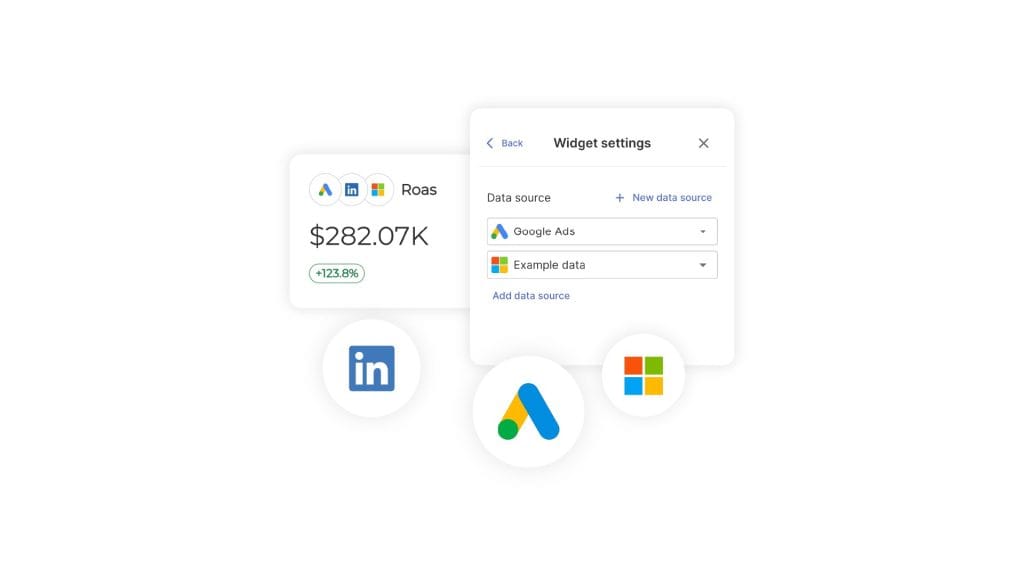
One honest limit: custom metrics don’t work inside a Combined Data Sources widget yet. If you need a blended custom metric, build it as a Manual KPI right next to the combined widget. For standard blended ROAS, the native metrics have you covered.
Want to try it on your own data? You can wire up your top two or three clients in the 14-day trial — no credit card, and 10 data sources are included. And if you want a fuller take on what to include in a marketing report, we wrote that up, along with the core GA4 metrics most reports should carry.
The Cadence Stack — Run Checklists on the Right Rhythm
Not every checklist runs on the same clock — and the mistake most teams make is treating them like they do. So here’s a simple model we call the cadence stack. Four layers, four rhythms: daily, weekly, monthly, quarterly. Nothing urgent waits a month, and nothing routine eats your day.
The Cadence Stack
Run each checklist on the rhythm it needs
Four layers, four clocks. Nothing urgent waits a month, and nothing routine eats your day.
Daily
Monitor & react
Weekly
Optimize
Monthly
Review & report
Quarterly
Go deep
The monthly layer is where reporting eats the most time — and it’s the easiest to automate and send on a schedule.
The layers are pretty intuitive once you see them. Daily is monitoring and quick reactions — anything broken or spiking, plus replying to comments. Light touch. Weekly is active optimization, the PPC and paid-social maintenance that rewards frequency. Monthly is review and reporting — your analytics checklist and the client report. Quarterly is the deep work: full audits, strategy reviews, and pruning the checklists themselves.
The monthly layer is where reporting eats the most hours — and where your client reporting best practices actually show up. It’s also the easiest to hand off. A scheduled report in Swydo sends itself to the client on whatever rhythm you set. Drop an AI Summary block into the email and every send goes out with a written recap of what changed — generated for you, not retyped each month. Set it once. It just runs.
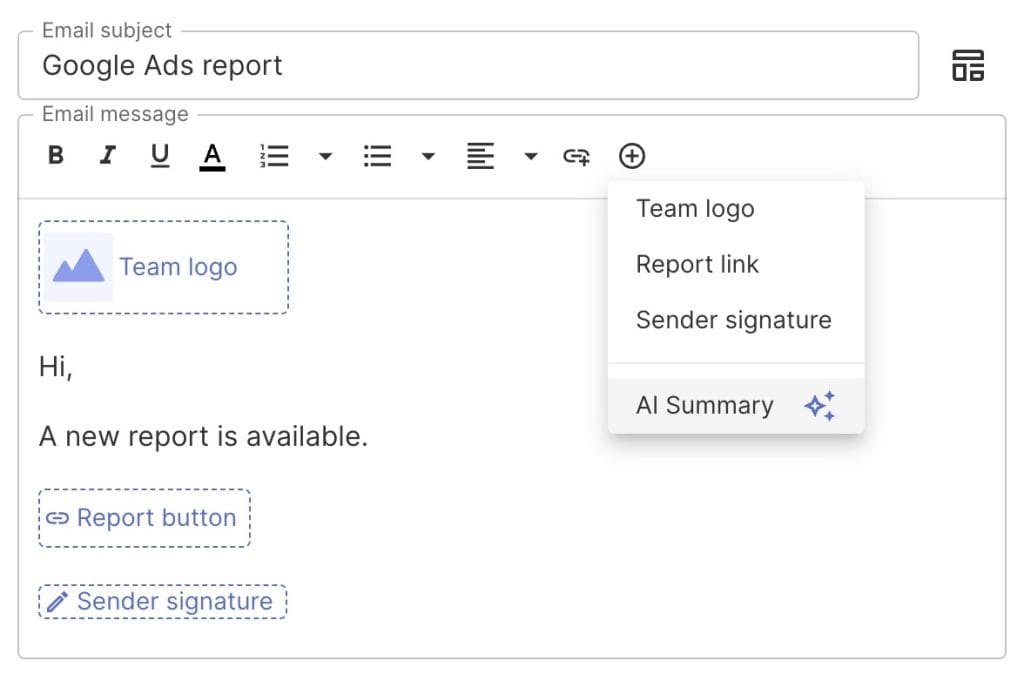
Quick note on the AI summaries. The plan includes 4,000 credits a month — a summary runs about 95 credits, so roughly 40 of them — and credits reset monthly instead of rolling over. If you’ll blow past that, set a monthly spend cap rather than topping up piecemeal. For most agencies, the included credits cover the monthly cycle fine. This is also how small teams stop drowning in reporting — more on that in our piece on how to scale a small agency’s reporting, and the wider case for report automation.
Where AI Agents Fit Into Your Checklists
AI changes your checklists two ways at once. It does some of the steps for you. And it adds steps you didn’t have before. Both belong on the list. In HubSpot’s most recent State of Marketing report, most marketers say they’re already using AI in their day-to-day work — so this isn’t a someday thing. It’s a now thing.
AI On Your Checklist
Let AI do the step — you keep the judgment
| Checklist step | AI that helps | What you still own |
|---|---|---|
| Draft 25 ad copy variations | ChatGPT, Claude, Gemini | Brand voice, the final picks, claims that must be true |
| Summarize last week’s GA4 anomalies | Gemini, Copilot | What’s actually worth acting on vs. noise |
| First cut of the report narrative | Claude, ChatGPT | The story, the recommendation, the client context |
| QA copy for tone and errors | Any assistant | Sign-off before anything ships |
| Trigger tasks when a deal closes or a report is due | Zapier, Make, n8n | The workflow logic and the exceptions |
The rule that keeps this safe: AI produces the draft, a named person owns the call. Put both on the checklist.
Start with what AI takes off your plate. “Write 25 ad copy variations.” “Draft the first cut of the monthly report narrative.” “Summarize last week’s GA4 anomalies.” Each of those is now a step you hand to ChatGPT, Claude, Gemini, or Copilot — and then check. Check is the key word. AI writes the draft. A person owns the judgment, the voice, and the final call. Your checklist should say which steps are delegated and who signs off.
Then there’s the automation layer. Zapier, Make, and n8n connect your apps so steps fire on their own — a closed deal spins up the onboarding tasks, a due report pings its owner, a new lead routes to the right person. One thing to plan around if you go this route: Swydo doesn’t have a public REST API yet. For now, custom data flows in through Google Sheets connected with Zapier or Make, which handles most of what agencies actually ask for.
And then the new steps. AI search has changed what “being found” even means, and your SEO and content checklists need to keep up. So add a step to track AI-search visibility — whether your clients show up in AI Overviews and assistants, not just the blue links. Swydo shows this directly: through the Semrush integration, you can report on AI Overview keyword presence right inside client reports. Not many reporting tools do that yet, and it’s an easy way to show clients you’re watching the channel before they think to ask. While you’re at it, add a step to track AI traffic in GA4 so referrals from ChatGPT and Perplexity don’t hide in your numbers. For the wider view, we dug into whether AI can improve digital marketing results separately.
The Privacy, Consent, and Tracking Checklist
Privacy and consent now sit upstream of every number you report. That’s what makes this checklist non-negotiable — it’s not legal box-ticking, it’s data integrity. Broken consent means broken data. And broken data means a report that’s quietly wrong. So this one protects the whole chain.
- Confirm Consent Mode v2 is live for EU, EEA, and UK traffic. It’s been required for advertisers serving those regions since March 2024, and without it your Google data for those users is incomplete.
- Confirm GA4 is getting consent signals. No signals, no behavioral modeling — and you’ll under-count conversions without realizing it.
- Honor Global Privacy Control signals. A growing number of US states now require it, and ignoring GPC is a real compliance risk.
- Check your cookie and consent banner against current rules. They differ by region and keep changing, so a stale banner is a liability.
- Confirm email sender authentication (SPF, DKIM, DMARC). Same steps as the email checklist — and the cost of skipping them is the inbox.
- Review data retention and processing settings quarterly. Defaults change and clients ask. Know your settings before someone makes you explain them.
The honest take? Agencies that treat consent as the legal team’s problem end up with reporting they can’t trust and clients they can’t defend. So put it on the checklist. Check it like you check conversion tracking — because it’s the same kind of risk.
How to Know Your Checklists Are Working
Measure your checklists like you’d measure a campaign. Track completion rate, rework rate, on-time delivery, and how happy clients are over time. If you can’t tell whether a checklist is helping, you’ll never know which steps to cut or add — and it slowly drifts back into a doc nobody trusts.
But your internal metrics are only half of it. The real test is whether the work moves the numbers clients actually care about — not the vanity metrics that look great and change nothing. We wrote a whole piece on the marketing KPIs your clients really care about, and it’s worth lining your reporting up with those.
This is where monitoring beats plain reporting. And there’s a real difference between monitoring and reporting. A report tells you what happened last month. But monitoring tells you something’s off today. Swydo’s monitoring suite does both. Set a Goal on any client metric — a real SMART goal with a target and a deadline — and it tracks as On Track, Off Track, or Achieved, with pacing. So you spot a budget overshooting mid-month, not at the post-mortem. Set an Alert and it checks a metric daily, then pings you by email or Slack the moment results go out of bounds. The point is simple. You find out a client’s off track before the call, not during it.
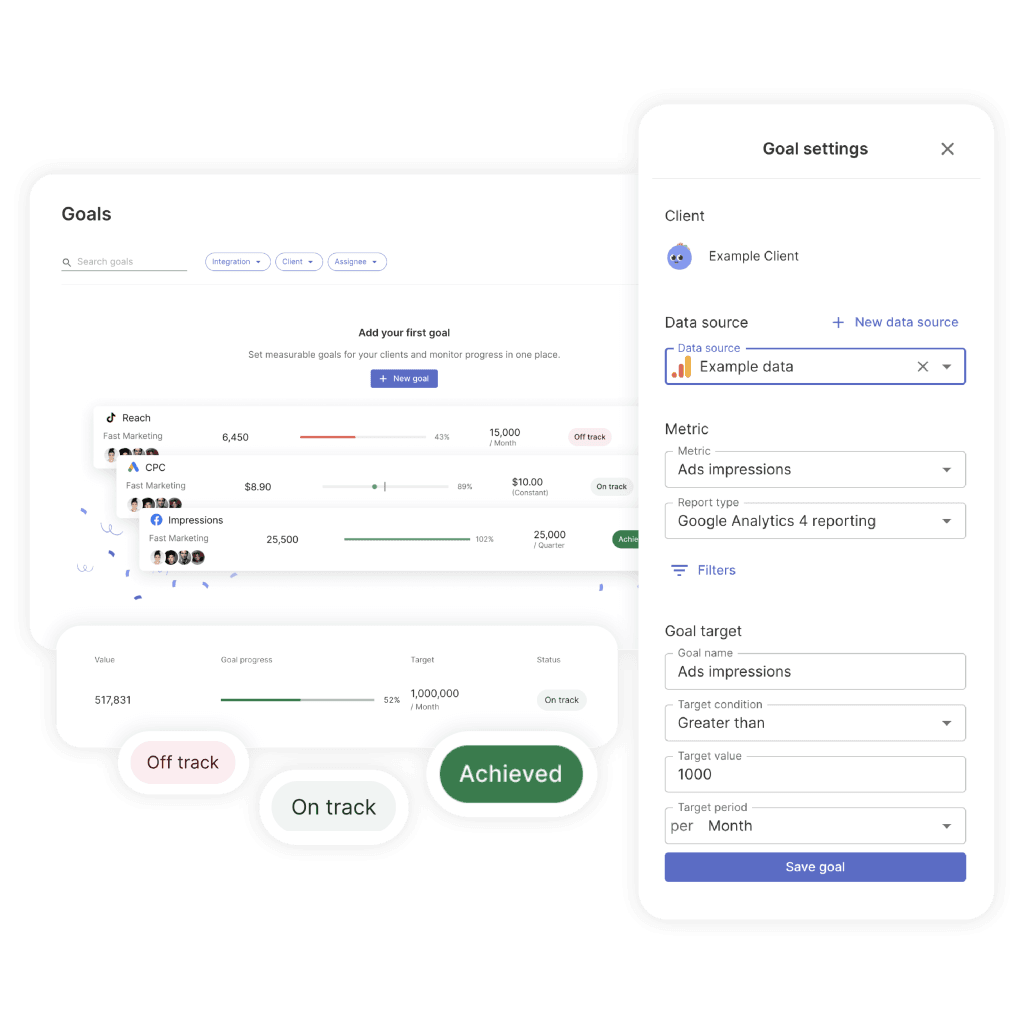
That early warning is most of what keeps a renewal chat calm instead of tense. You can set the whole thing up in the 14-day trial and watch the first alert fire within a day.
How to Make Checklists Part of How Your Team Works
A checklist only works if it’s part of the actual workflow — not a separate doc people are supposed to remember exists. So build it into the tool your team already uses, give each list a clear owner, and review them on a set schedule so they stay current.
The teams that nail this treat checklists as living assets. Each list has an owner who keeps it current. Dead steps get cut. New platform rules get added. And the whole thing lives inside the project tool, so following it is the easy path, not extra work. That’s a big part of what being a data-driven marketing agency really means — process you can see and improve, instead of knowledge trapped in one person’s head.
Checklists make onboarding smoother, too — for new hires and new clients alike. A documented, repeatable client onboarding process is really just your most important checklist.
Free Template
Build your marketing checklist
Pick the channels you run, tick items off as you go, then export to keep or share. Nothing’s saved to a server — it’s all yours.
1. Choose your checklists
2. Work the list
0 of 0 done
Final Thoughts
A short checklist your team runs every time beats a thorough one they ignore. So cut hard. Give every step an owner. Make “done” concrete and build your timelines backward — then let AI and automation handle the repeatable steps while your people keep the judgment.
The last piece is proof. Checklists make the work consistent. Your reporting shows it worked. Get both right, and the firefighting stops.
So — what does your reporting look like on a Tuesday morning? If “a scramble” is the honest answer, a checklist is where the fix starts.
Marketing Checklist FAQ
Straight answers to the questions teams ask most about marketing checklists
A marketing checklist is a written, repeatable list of the steps a task needs — in order, with one owner on each step. It turns what lives in your best person’s head into instructions anyone can follow to the same standard. In short, it moves quality from “depends who did it” to “the same every time.”
Only the steps that change the outcome — the actions the work genuinely breaks without. Each step needs one clear owner and a concrete definition of “done.” Keep strategy, theory, and nice-to-haves off the run-it-every-time list: if skipping a step doesn’t hurt the work, it doesn’t belong on it.
A checklist is the short list of must-do steps for a single task. An SOP (standard operating procedure) is the fuller document explaining how and why a process runs, including context and exceptions. A workflow is the sequence of tasks and handoffs across people and tools. Think of the checklist as the quick, run-it-every-time core, and the SOP as the reference behind it.
Yes — especially once you scale past personally checking every deliverable. The work of surgeon Atul Gawande popularized the finding that in complex fields, a good checklist measurably cuts errors, and marketing is exactly that kind of complexity. The payoff shows up as steadier delivery, fewer repeat mistakes, and protected margin.
Because most agencies don’t have a talent problem — they have a consistency problem. Checklists give every client the same standard whether your lead or a second-week hire did the work, speed up onboarding, prevent the rework that eats margin, and free senior people from babysitting process. They pay off most right when you start to scale and can’t eyeball everything yourself.
Build it in five passes: brainstorm every possible step, trim to only the ones that change the outcome, assign one owner and a clear “done” to each, set the timeline backward from the deadline, then test it on real work and fix what snags. Draft the first version with whoever does the task best — they know the autopilot steps no one writes down.
Short enough that your team runs it every time. A seven-item list people actually complete beats a forty-item one they skip, because a bloated list teaches everyone that checklists are optional. The test for each step: does the work break, or get noticeably worse, without it? If not, cut it.
As many as you have repeatable tasks worth standardizing — usually one per channel or deliverable, each run on its own rhythm. Resist building one giant master list, since long lists get ignored. Keep each one short and single-purpose, like an SEO checklist, a reporting checklist, and an onboarding checklist, so the right list is easy to grab for the job in front of you.
Something you can see and check, not interpret. “Optimize the campaign” is a wish; “add 10 negative keywords from last week’s search terms report” is done-able. The more concrete the action, the more likely it gets done and the easier it is to verify — and fuzzy completion is one of the fastest ways a checklist quietly fails.
For four fixable reasons: the list gets too long, no one owns the steps, “done” is fuzzy, and it never gets reviewed. Length kills first, so cut anything that doesn’t break the work when skipped. Then put one name on every step, make completion concrete, and review on a schedule. A checklist is a living thing, not a one-time build.
Build it into the tool they already work in, not a separate doc they’re supposed to remember. Keep it short, give every step an owner, and review it on a set rhythm so it stays current. When following the checklist is the easy path instead of extra work, adoption mostly takes care of itself.
The one your team will actually open. Most agencies do best with the project management app they already use, plus a spreadsheet for custom lists. Google Sheets is the simplest start — free, instant to share, and easy to template. Trello suits card-thinkers; Asana, ClickUp, or Monday fit teams needing timelines and recurring tasks; Notion or Airtable work when a checklist ties to client records.
On the rhythm each one needs, not all on the same clock. Daily is monitoring and quick reactions. Weekly is active optimization, like PPC and paid-social upkeep. Monthly is review and reporting, including your analytics checklist and the client report. Quarterly is the deep work: full audits, strategy reviews, and pruning the checklists themselves.
The must-do steps that have to be right before a campaign goes live: confirm conversion tracking and consent signals actually fire, check that creative and targeting are set, make sure budgets and bid caps match the plan, and test every link and landing page. Half-wired tracking at launch is one of the most common and most expensive misses, so check it first.
Reporting tells you what happened last month; monitoring tells you something’s off today. A report is the scheduled recap; monitoring is a live check that flags a budget overshooting or a metric out of bounds while you can still act. Teams that only report find problems at the post-mortem — monitoring catches them before the client call.
Automate the repeatable, predictable steps and keep judgment calls manual. Tools like Zapier, Make, and n8n can fire steps on their own, so a closed deal spins up onboarding tasks or a due report pings its owner. But anything that needs a decision, brand voice, or sign-off stays with a named person. The goal is to remove busywork, not oversight.
Measure them like a campaign: track completion rate, rework rate, on-time delivery, and client satisfaction over time. If you can’t tell whether a checklist helps, you won’t know what to cut or add. The deeper test is whether the work moves the numbers clients actually care about — so align your reporting with their real KPIs, not vanity metrics.
In two ways at once: it now does some of your steps, and it adds new ones. AI can draft ad copy, summarize analytics anomalies, and write a first cut of a report narrative — while new steps like tracking AI-search visibility join your SEO and content lists. The safe rule is simple: AI produces the draft, and a named person owns the final call.
The draft-heavy, repeatable ones: first drafts of ad copy, report narratives, and content briefs, plus summaries of analytics data and a QA pass for tone and errors. Tools like ChatGPT, Claude, Gemini, and Copilot handle these well. What stays with you is brand voice, claims that must be true, deciding what’s worth acting on, and sign-off before anything ships.
Treat AI visibility as its own checklist step. Structure content to answer the main question early so an AI summary can lift it, add valid schema, use clear headings, and put a named, credible author on each piece. Then track whether clients appear in AI Overviews and assistants, and watch GA4 for referral traffic from tools like ChatGPT and Perplexity so it doesn’t hide in your numbers.
Because consent now sits upstream of every number you report — broken consent means broken data, and broken data means a report that’s quietly wrong. Confirm Consent Mode v2 is live for EU, EEA, and UK traffic, that GA4 is receiving consent signals, and that you honor Global Privacy Control where required. Check it like you check conversion tracking; it’s the same kind of risk.
No — AI changes what’s on the checklist, but it doesn’t remove the need for one. Someone still has to define the steps, decide which to delegate, and own the result. AI handles the drafting and some of the doing, while the checklist keeps the work consistent and makes clear who signs off. They work together, not instead of each other.
Your checklists keep the work consistent — Swydo proves it moved the numbers.
Start Your Free Trial Today