
Your clients are getting traffic from ChatGPT, Perplexity, and Claude right now. The problem? Google Analytics 4 is hiding it from you.
Here’s what’s happening: someone asks ChatGPT for product recommendations in your client’s industry. The AI responds with a helpful answer and includes a link to your client’s website. That visitor clicks through, browses three pages, and converts. In your GA4 reports, this high-value session appears as just another “Referral” visit—lumped together with traffic from random forums, coupon sites, and everywhere else.
This matters more than you might think. According to Adobe Analytics research from late 2025, AI referral traffic converts at 4.4 times the rate of traditional search traffic. These visitors spend 68% longer on sites and view over three times as many pages per session. Yet without custom configuration, most agencies can’t tell their clients how much AI-driven traffic they’re actually getting—or which AI platforms are sending it.
This guide will show you exactly how to uncover that hidden traffic. We’ll walk through the GA4 setup, share the regex patterns that actually work, and explain why even a perfect configuration will still miss a significant portion of AI-influenced visits. By the end, you’ll have everything you need to track AI traffic accurately—and just as importantly, you’ll understand the limitations so you can set proper expectations with clients.
Understanding the Difference Between AI Crawlers and AI Referrals
Before touching any settings in GA4, you need to understand a distinction that trips up many marketers: AI traffic comes in two completely different forms, and they require different tracking approaches.
AI Crawlers: The Bots You Don’t Need to Track in GA4
The first type is crawler traffic. These are automated bots like GPTBot, ClaudeBot, and PerplexityBot that visit your site to scrape content. They’re gathering training data for large language models or indexing pages for AI-powered search features. No human is involved in these visits.
GA4 automatically filters out most of this bot traffic using the IAB International Spiders and Bots List. This happens behind the scenes—you can’t turn it off, and you can’t see how much traffic was filtered. That’s actually fine for marketing purposes, because crawler visits have zero engagement metrics that matter. A bot doesn’t read your content, click your calls-to-action, or convert into a lead.
If you need visibility into crawler activity for SEO or content strategy purposes (which AI bots are accessing your site, and how often?), you’ll need to analyze your server logs using tools like Screaming Frog. That’s a separate discipline from what we’re covering here.
AI Referrals: The Human Traffic You Must Track
AI Traffic vs. Google Organic Search
Engagement & conversion metrics compared
First-Session Conversion
Session Duration
Pages Per Session
Overall Conversion Rate
AI Referral Traffic
Google Organic Search
Sources: Conductor Nov 2025 Report, Adobe Analytics Research 2025
The second type—and the one that should command your attention—is referral traffic. This is what happens when a real person uses an AI assistant, receives a response that includes a link to your client’s website, and clicks through to visit. These are genuine prospects engaging with genuine content, and they exhibit remarkably strong engagement signals.
According to the November 2025 Conductor benchmark report, 73% of visitors from AI referrals convert during their first session, compared to just 23% of visitors from Google organic search. The quality gap is stark—and closing fast. Revenue per visit from AI traffic improved from just 3% of non-AI traffic in July 2024 to 70% by May 2025, based on Adobe’s tracking across retail sites.
The problem is that GA4 doesn’t distinguish these high-value visitors. When someone clicks a link from ChatGPT’s response, GA4 sees “chatgpt.com” as the referrer and files that session under the generic “Referral” channel. It’s technically accurate, but practically useless—you can’t optimize a channel you can’t see.
Why GA4’s Default Setup Fails to Capture AI Traffic
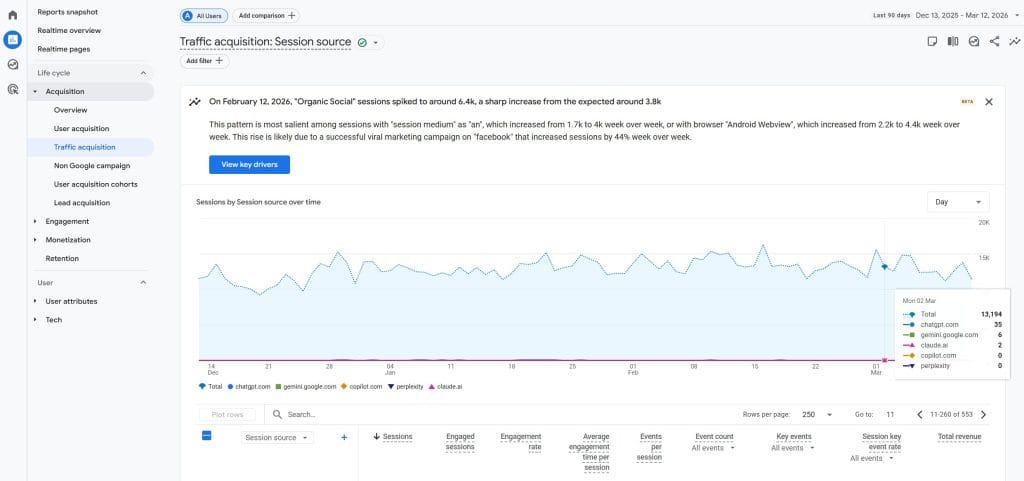
Google Analytics 4 ships with 18 default channel groupings: Organic Search, Paid Search, Direct, Referral, Social, Email, and so on. Notice what’s missing? There’s no “AI” channel.
This creates three specific problems for agencies trying to measure AI-driven traffic:
All AI referrals get lumped into “Referral.” Traffic from ChatGPT sits alongside traffic from Yelp, Wikipedia, and obscure backlinks. You’d need to manually filter by source in every report to see AI traffic specifically. Most agencies never do this, so the data sits there unseen.
Google AI Overviews traffic is invisible. When someone clicks through from Google’s AI-generated answers at the top of search results, GA4 classifies this as regular “Organic Search.” There’s no automatic way to separate AI-assisted search clicks from traditional organic clicks. (We’ll cover a partial workaround later, but it has limitations.)
A significant portion appears as “Direct.” Mobile app traffic from ChatGPT often loses its referrer header entirely. When someone uses the ChatGPT iOS or Android app and clicks a link, the browser that opens may not know where the click originated. The result? GA4 logs it as Direct traffic, which is the analytics equivalent of “we have no idea where this came from.”
Google has acknowledged the need for AI traffic tracking. In late 2024, they updated their custom channel groups documentation to include an example regex pattern for “AI assistants.” But it remains an example buried in help documentation, not a default configuration. If you want your clients’ reports to show AI traffic, you need to set it up yourself.
Setting Up a Custom Channel Group for AI Traffic
The solution is to create a custom channel group that identifies AI referrers before they get classified as generic referral traffic. This isn’t complicated, but it does require careful attention to a few details that are easy to overlook.
Step-by-Step Configuration
GA4 Custom Channel Setup
5 steps to surface hidden AI traffic in your reports
1
Navigate to Channel Groups
Open your GA4 property settings
Admin → Data Display → Channel Groups
2
Create New Channel Group
Duplicate the default group or create from scratch. Name it something like “Default + AI Traffic” for clarity.
3
Add “AI Traffic” Channel
Add a new channel, set the field to Source, operator to “matches regex,” and paste your regex pattern covering AI referrers.
4
Reorder — Move AI Above Referral
This is the #1 mistake agencies make. GA4 processes rules top-to-bottom. If AI Traffic sits below Referral, AI visits match Referral first and your custom channel never fires.
Save & Apply to Reports
Custom channel groups don’t replace defaults automatically. Select your new group in each report and exploration where you want AI traffic visible.
Estimated time: ~30 minutes for full setup
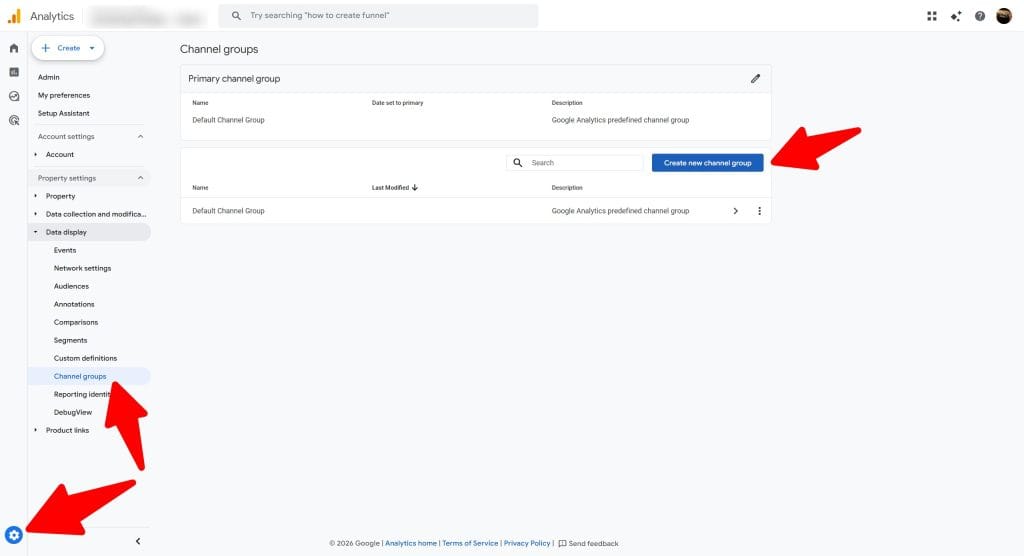
Start by navigating to Admin → Data Display → Channel Groups in your GA4 property. You’ll see your existing Default Channel Group here.
Click “Create new channel group” to build a custom version. Give it a clear name like “Default + AI Traffic” so you can easily identify it in reports. Alternatively, you can duplicate the default group and modify the copy—either approach works.
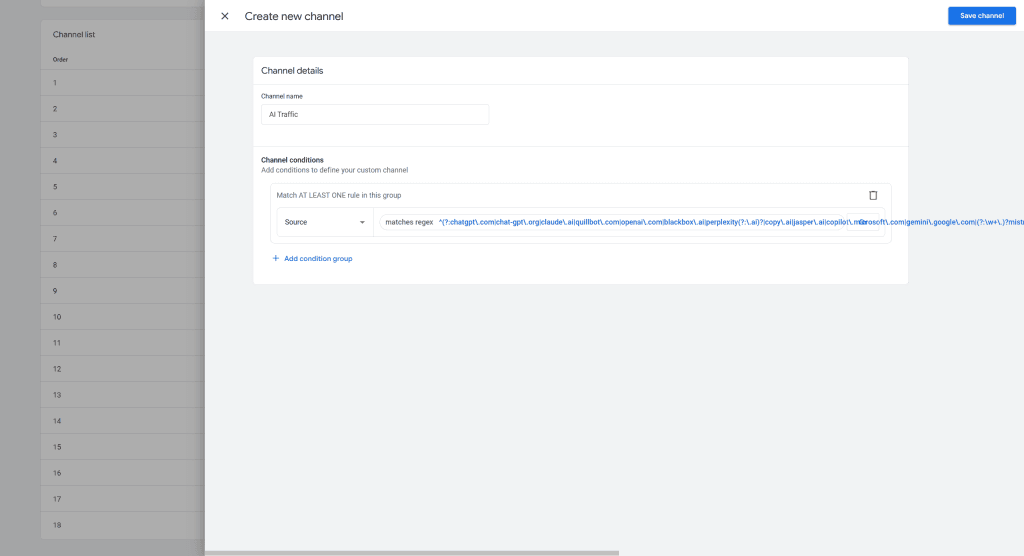
Within your new channel group, click “Add new channel” and name it “AI Traffic” or “AI Referrals.” This is what will appear in your reports.
Now configure the matching condition. Set the field to Source, the operator to matches regex, and paste in your regex pattern (we’ll provide recommended patterns in the next section).
Here’s where most agencies make their first mistake: forgetting to reorder the channels. GA4 processes channel rules from top to bottom, assigning traffic to the first matching channel it finds. If your AI Traffic channel sits below the Referral channel, a visit from chatgpt.com will match Referral first and never reach your AI Traffic rule.
Click the “Reorder” button and drag your AI Traffic channel above the Referral channel. This ensures AI sources get captured by your custom channel before the generic Referral catch-all.
Save your channel group, then remember to apply it to your reports and explorations. Custom channel groups don’t automatically replace the default in existing reports—you need to select them specifically.
The Regex Patterns That Actually Work
The regex pattern you use determines which AI platforms your channel will capture. Google’s example pattern from their documentation covers the major players, but the community has developed more comprehensive alternatives.
Production-ready pattern (covering 30+ AI platforms as of January 2026):
^(?:chatgpt\.com|chat-gpt\.org|claude\.ai|quillbot\.com|openai\.com|blackbox\.ai|perplexity(?:\.ai)?|copy\.ai|jasper\.ai|copilot\.microsoft\.com|gemini\.google\.com|(?:\w+\.)?mistral\.ai|deepseek\.com|edgepilot|edgeservices|nimble\.ai|iask\.ai|aitastic\.app|bnngpt\.com|writesonic\.com|exa\.ai|cohere\.ai|huggingface\.co|anthropic\.com|poe\.com|pi\.ai|phind\.com|character\.ai|you\.com|meta\.ai|grok\.x\.com|x\.ai)$
This pattern was developed and is maintained by Dana DiTomaso at Analytics Playbook. It’s updated regularly as new AI platforms emerge and referral patterns change.
For agencies that want more granular reporting, consider splitting this into two channels: one specifically for ChatGPT (which accounts for roughly 87% of all AI referral traffic, according to Conductor’s research) and another for all other AI platforms. This approach lets you report on ChatGPT’s impact specifically while still capturing the long tail of smaller AI tools.
ChatGPT-only pattern:
^(?:chatgpt\.com|chat-gpt\.org|openai\.com|chat\.openai\.com)$
Other AI platforms pattern:
^(?:claude\.ai|anthropic\.com|perplexity(?:\.ai)?|gemini\.google\.com|copilot\.microsoft\.com|meta\.ai|poe\.com|you\.com|phind\.com|mistral\.ai|deepseek\.com|grok\.x\.com)$
A note on case sensitivity: GA4’s regex matching is case-sensitive by default. The sources should appear in lowercase in your data, but you can add the (?i) flag at the beginning of your pattern to make it case-insensitive if you’re seeing mixed case issues.
Complete AI Referrer Reference List
The AI landscape evolves quickly. Platforms launch, rebrand, and change their referral behavior without notice. Here’s a comprehensive list of current AI referrers as of January 2026, along with what you should know about each:
AI Referral Platforms to Track
Major sources of AI-driven traffic, ranked by current share
ChatGPT / OpenAI
chatgpt.com, openai.com
~87%
of all AI traffic
Dominant
Platform
Referrer Domain
Share
Trend
Google Gemini
gemini.google.com
Growing
↑ 388% YoY
Perplexity
perplexity.ai
~4%
↑ Rising
Claude
claude.ai, anthropic.com
~2%
↑ Growing
MS Copilot
copilot.microsoft.com
~2%
↑ B2B focus
Meta AI
meta.ai
<1%
New
DeepSeek
deepseek.com
<1%
New
Grok
grok.x.com, x.ai
<1%
New
Source: Conductor November 2025 Benchmark Report
This list will need periodic updates. New AI tools emerge regularly, and existing platforms sometimes change their domain structure. Building a quarterly review of your regex patterns into your analytics maintenance routine is good practice.
The “Dark AI Traffic” Problem (And Why Your Numbers Will Always Be Incomplete)
Where Does Your AI Traffic Actually Go?
Most AI-influenced visits never get attributed correctly in GA4
User asks an AI assistant a question
AI responds with your brand, product, or a link to your site
30–40%
Visible in GA4
Clicks link directly → referrer preserved → shows as AI Traffic
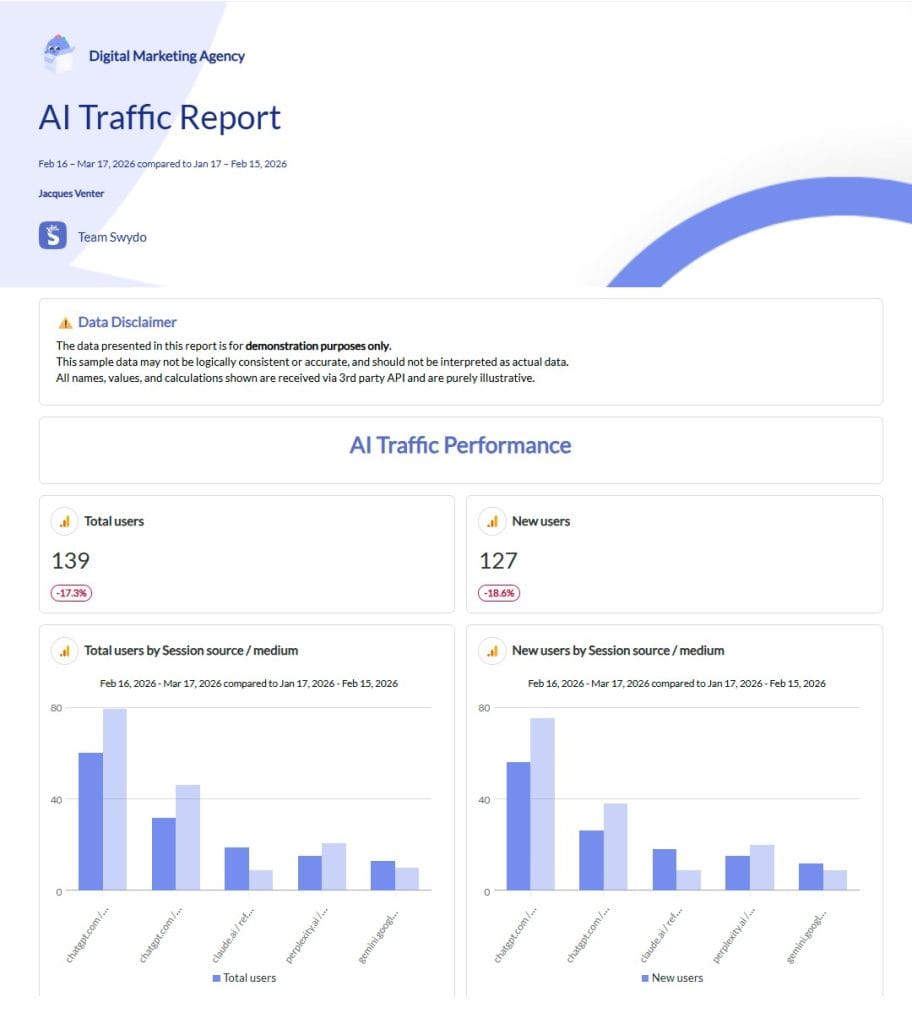
60–70%
“Dark” AI Traffic
Visit happens but AI attribution is lost → appears as Direct, Organic, or Referral
User copies URL from AI response, pastes into browser → logged as Direct
Mobile app-to-browser handoff drops referrer header → logged as Direct
AI mentions brand without link, user searches it → logged as Organic Search
Privacy features (Safari ITP, etc.) strip referrer data → logged as Direct
GA4 data is the floor, not the ceiling. Real AI influence is likely 2–3× what your reports show.
Here’s an uncomfortable truth: even with perfect GA4 configuration, you’re only seeing a fraction of AI-influenced traffic. Industry estimates suggest visible AI referrals represent just 30-40% of actual AI-driven visits.
The rest disappears into what some analysts call “dark AI traffic”—visits influenced by AI that analytics tools simply cannot attribute correctly. Understanding why this happens will help you set realistic expectations with clients.
Copy-and-Paste Behavior
Most ChatGPT users don’t click links directly. They copy the URL from the response and paste it into their browser. This creates a new browser session with no referrer information—GA4 logs it as Direct traffic. The AI initiated the visit, but there’s no technical trail connecting them.
Mobile App Referral Loss
When someone uses ChatGPT’s mobile app and taps a link, the app opens the device’s default browser. This app-to-browser handoff often drops the referrer header entirely. The visit appears in GA4, but the source shows as Direct because the browser doesn’t know the click originated from ChatGPT.
AI Answers Without Links
Sometimes AI assistants mention brands or products without including hyperlinks. The user then types the company name directly into their browser (Direct) or searches for it on Google (Organic Search). The AI created the awareness and intent, but the resulting visit shows up under a completely different channel.
This is particularly common with informational queries. If someone asks “what’s the best CRM for small businesses” and ChatGPT mentions HubSpot by name without a link, that person might visit hubspot.com directly or Google “HubSpot pricing.” The AI-initiated journey becomes invisible to analytics.
Privacy Features Strip Referrers
Safari’s Intelligent Tracking Prevention and various browser privacy settings can strip or truncate referrer data. A visit that originated from an AI platform might arrive at your site with that origin information already removed.
What This Looks Like in Practice
The SaaS company Tally discovered this gap firsthand. They added a simple post-signup survey asking “How did you hear about us?” and found that 25% of new users mentioned ChatGPT—far exceeding what their analytics showed for AI referral traffic. The lesson: GA4 data should be considered a floor, not a ceiling, when estimating AI influence.
For agencies, this creates an opportunity to provide additional value. Implementing post-conversion surveys that specifically include AI options (“ChatGPT,” “Perplexity,” “An AI assistant,” etc.) gives you a second data point to triangulate against your GA4 numbers. When you can show clients that AI influence extends well beyond what appears in standard reports, you’re demonstrating analytical sophistication that competitors may lack.
Advanced Tracking: Google AI Overviews and Text Fragments
Google’s AI Overviews—the AI-generated answers that appear at the top of search results—present a unique tracking challenge. These clicks come from google.com, so GA4 classifies them as Organic Search. There’s no native way to separate AI-assisted search from traditional organic.
However, there’s a partial workaround using URL fragments. When someone clicks on highlighted text within an AI Overview (or Featured Snippet, or People Also Ask), Google appends a text fragment to the URL that looks like #:~:text=highlighted%20phrase. This fragment tells the browser to scroll to and highlight that specific text on the page.
You can capture this fragment using Google Tag Manager. Create a Custom JavaScript variable that checks for the presence of :~:text= in the URL hash:
function() { var hash = window.location.hash; if (hash.indexOf(':~:text=') !== -1) { return decodeURIComponent(hash.split(':~:text=')[1]); } return null;}
When this variable returns a value, fire a custom event (something like ai_overview_click) and send the highlighted text as an event parameter. Register this parameter as a custom dimension in GA4, and you’ll be able to filter Organic Search traffic to see only sessions that arrived via text-highlighted links.
A few caveats: This technique captures highlighted-text clicks specifically, not all AI Overview clicks. Users who click links that don’t have text highlighting won’t trigger this detection. And the text fragment doesn’t tell you definitively that the click came from an AI Overview—Featured Snippets and PAA boxes use the same mechanism. Still, it provides useful directional data that most competitors won’t have.
GTM Configuration for Enhanced AI Tracking
Beyond the basic custom channel setup, Google Tag Manager allows you to capture AI referral data as event parameters. This gives you more flexibility for analysis and lets you create audiences based on AI traffic.
Create a Custom JavaScript variable that detects AI referrers:
function() { var referrer = document.referrer.toLowerCase(); var aiPatterns = [ 'chatgpt.com', 'chat.openai.com', 'openai.com', 'perplexity.ai', 'claude.ai', 'anthropic.com', 'gemini.google.com', 'copilot.microsoft.com', 'meta.ai', 'poe.com', 'you.com', 'phind.com', 'mistral.ai', 'deepseek.com', 'grok.x.com' ]; for (var i = 0; i < aiPatterns.length; i++) { if (referrer.indexOf(aiPatterns[i]) !== -1) { return aiPatterns[i].split('.')[0]; } } return null;}
This variable returns the AI platform name (“chatgpt”, “perplexity”, “claude”, etc.) when detected, or null for non-AI traffic. You can then:
- Create a trigger that fires on Page View when the variable is not null
- Fire a custom event (like ai_referral_detected) with the platform name as a parameter
- Register ai_source_platform as a custom dimension in GA4
- Build audiences of “users who arrived via AI referral” for remarketing or analysis
This approach complements rather than replaces the custom channel group. The channel group handles attribution in standard reports; the custom event gives you flexibility for exploration and audience building.
The Ten Mistakes Agencies Make When Tracking AI Traffic
After working with dozens of analytics implementations, patterns emerge in what goes wrong. Avoid these common pitfalls:
- Never creating a custom channel at all. This is the most common issue. Without explicit configuration, AI traffic remains hidden in the Referral bucket forever. GA4 won’t change its defaults for you.
- Forgetting to reorder channels. The second most common mistake. Your AI Traffic channel must appear above Referral in the priority order, or traffic will never reach it.
- Case-sensitivity issues in regex. GA4 regex is case-sensitive. If your pattern uses “ChatGPT” but the source appears as “chatgpt”, it won’t match. Stick to lowercase patterns.
- Only tracking ChatGPT. While ChatGPT dominates current traffic, Perplexity, Claude, and especially Gemini (up 388% year-over-year) represent growing sources. A narrow pattern means missing emerging traffic.
- Assuming GA4’s bot filter handles AI tracking. The bot filter removes crawler traffic—it doesn’t help identify valuable AI referral traffic. These are separate concerns.
- Confusing crawlers with referrals. Bots scraping your site for training data and humans clicking links from AI responses require completely different analysis approaches. Don’t conflate them in reporting.
- Using last-click attribution exclusively. AI often functions as an awareness touchpoint early in the customer journey. Last-click attribution may credit the conversion to a later touchpoint while AI did the heavy lifting. Data-driven attribution reveals a more accurate picture.
- Ignoring Google AI Overviews. This traffic appears as regular Organic Search without special tracking. If you’re not implementing the text fragment detection described earlier, you have no visibility into AI-assisted search behavior.
- Missing the “(not set)” medium problem. ChatGPT sometimes passes utm_source without utm_medium. This can cause traffic to be classified as “Unassigned” rather than matching your AI channel. Consider adding a condition that matches your AI source regex when medium equals “(not set)”.
- Treating GA4 numbers as complete. Visible AI referrals are the tip of the iceberg. Set client expectations appropriately—the real AI influence is likely 2-3x what reports show.
Current Benchmarks
Setting appropriate expectations requires knowing what typical AI traffic looks like. Here are the current benchmarks from industry research:
AI Traffic Benchmarks: 2025–2026
Key metrics every agency should know right now
4.4×
Higher Conversion Rate
AI referrals vs. traditional search
73%
First-Session Conversions
vs. 23% from Google organic
63%
Sites Getting AI Traffic
Majority of websites now receiving AI referrals
1–3%
Average Traffic Share
Small volume, but highest engagement
+68%
Longer Session Duration
AI visitors stay significantly longer
3.2×
More Pages Per Session
Deeper engagement vs. organic
AI Traffic Growth Since 2024
Year-over-year volume increase
9.7×
Revenue per visit from AI traffic improved from 3% of non-AI (Jul 2024) to 70% of non-AI (May 2025)
Jul 2024: 3%May 2025: 70%
Sources: Conductor Nov 2025, Adobe Analytics Research 2025
Sources: Conductor November 2025 Report, Adobe Analytics Research (2025)
The key insight from these benchmarks: AI traffic is still small in absolute terms (1-3% of total) but dramatically outperforms on engagement and conversion metrics. This isn’t a volume play yet—it’s a quality play. Agencies that can demonstrate this quality difference to clients have a compelling story to tell about why AI traffic measurement matters.
Client Reporting Framework for AI Traffic
Once you’ve implemented tracking, you need to present the data in a way that’s meaningful to clients. Here’s a recommended structure for AI traffic reporting:
Overview Section
Start with total AI sessions from your custom channel, month-over-month and year-over-year trends, and a platform breakdown showing which AI tools are sending traffic. Include a comparison table showing AI traffic versus Organic Search versus Direct—this contextualizes the AI numbers within the broader traffic mix.
Engagement Quality Section
This is where AI traffic typically shines. Show session duration by source, pages per session, engagement rate, and bounce rate. Create a side-by-side comparison with other channels to highlight the quality difference. If AI visitors are spending twice as long on site and viewing three times as many pages, that’s a story worth telling.
Conversion Analysis Section
Report on key event rates (form submissions, signups, purchases) by AI platform. If you’re using data-driven attribution, show where AI appears in conversion paths—you may find it’s generating awareness that leads to conversions attributed to other channels. For e-commerce clients, include revenue attributed to AI traffic.
Content Performance Section
Identify which landing pages receive the most AI traffic. This reveals what content AI tools are citing when they send users to your client’s site. The pages that perform well organically may not be the same ones that AI tools prefer to reference—spotting these differences creates content optimization opportunities.
Looker Studio Formula for Custom Reports
If you’re building reports in Looker Studio and want to add an AI traffic dimension without creating a full custom channel group, use this calculated field:
CASE WHEN REGEXP_MATCH(Session source, "chatgpt|openai|perplexity|claude|gemini|copilot|anthropic|deepseek|meta\\.ai") THEN "AI Traffic" ELSE Session default channel group END
This formula lets you segment traffic on the fly within Looker Studio reports without modifying the underlying GA4 configuration.
Implementation Checklist
Use this checklist to ensure complete AI traffic tracking implementation:
Phase 1: Quick Setup
These five steps get AI traffic visible in your GA4 reports. Most agencies can complete all of them in a single sitting—30 to 60 minutes total.
| # | Action | Details | Time |
|---|---|---|---|
| 1 | Audit existing AI traffic | Open GA4 → Reports → Traffic Acquisition. Filter the Referral channel by source to see if chatgpt.com, perplexity.ai, or other AI domains already appear. Document what you find as your baseline. | 5 min |
| 2 | Create a custom channel group | Admin → Data Display → Channel Groups → Create new. Name it clearly (e.g., “Default + AI Traffic”). Add a channel called “AI Traffic” with Source matches regex and paste your chosen regex pattern. | 10 min |
| 3 | Reorder channels | Drag the AI Traffic channel above Referral in the priority list. GA4 processes rules top-to-bottom—if Referral comes first, AI visits match it and your new channel never fires. This is the #1 mistake agencies make. | 2 min |
| 4 | Apply to reports | Custom channel groups don’t replace the default automatically. Select your new group in each report and Exploration where you need AI traffic visible. | 5 min |
| 5 | Build a basic Exploration | Create a Free Form Exploration with your custom channel group as a dimension. Add sessions, engagement rate, and key events as metrics. This becomes your go-to view for monitoring AI traffic. | 10 min |
Result: AI referral traffic appears as its own channel in reports. You can see volume, engagement, and conversions from AI platforms immediately.
Phase 2: Advanced Tracking
Once the basics are in place, these steps give you deeper insight and fill gaps in attribution. Tackle them in any order based on what matters most for your clients.
| # | Action | Details | Time |
|---|---|---|---|
| 6 | Deploy GTM event for AI referrals | Create a Custom JavaScript variable that checks document.referrer against AI domains and returns the platform name. Fire a custom event (ai_referral_detected) on Page View when the variable is not null. This enables audience building and more flexible analysis. | 15 min |
| 7 | Register a custom dimension | In GA4, go to Admin → Custom Definitions and register ai_source_platform as a custom dimension. Map it to the event parameter from Step 6. Now you can break down AI traffic by specific platform in any report. | 5 min |
| 8 | Track Google AI Overview clicks | Add a Custom JavaScript variable in GTM that checks for #:~:text= in the URL hash. When present, fire an ai_overview_click event with the highlighted text as a parameter. Register this as a custom dimension for filtering. | 15 min |
| 9 | Add AI options to post-conversion surveys | Add a “How did you hear about us?” question to signup or checkout flows. Include specific AI options: ChatGPT, Perplexity, Claude, “An AI assistant,” etc. This captures “dark” AI traffic that analytics can’t attribute. | Varies |
| 10 | Update Looker Studio dashboards | Add an AI traffic section to client reports. Use the CASE/REGEXP_MATCH formula to create an AI traffic dimension without modifying GA4 config. Include engagement comparisons and conversion metrics. | 20 min |
Result: You have platform-level AI attribution, visibility into Google AI Overviews, a self-reported data layer to cross-reference against analytics, and client-ready dashboards.
Ongoing Maintenance
AI platforms change domains, launch new products, and alter referral behavior without notice. Build these habits into your regular analytics routine:
- Review and update regex patterns quarterly. New AI tools emerge regularly—check for platforms sending traffic that your pattern doesn’t yet capture.
- Set up automated alerts for significant changes in AI traffic volume (spikes or drops may signal new platform behavior).
- Cross-reference survey data with GA4 data to estimate the true scale of AI influence. GA4 numbers are the floor, not the ceiling.
- Monitor for case-sensitivity issues and (not set) medium problems that can cause AI traffic to slip into Unassigned.
What Actually Matters
Three numbers tell the story: AI referrals convert at 4.4× the rate of organic search, but visible AI traffic only accounts for 30–40% of actual AI-driven visits, and ChatGPT alone sends 87% of it.
Your GA4 setup needs exactly two things to capture this: a custom channel group with the regex pattern from this guide, and that channel ordered above Referral. That’s 30 minutes of work. Everything else — GTM events, AI Overview tracking, survey data — builds on that foundation.
The one thing GA4 can’t fix: most AI-influenced visits will never show up as AI traffic. Users copy-paste URLs, mobile apps drop referrers, and AI mentions brands without linking. A post-conversion survey asking “How did you hear about us?” with AI-specific options will consistently reveal 2–3× more AI influence than your analytics reports show.
Update your regex quarterly. AI platforms rebrand, launch new domains, and change referral behavior without warning. The pattern that works today will have gaps by next quarter.
AI Traffic Tracking in GA4 — FAQ
How to find, measure, and report on the AI referral traffic GA4 is hiding from you
AI referral traffic is when a real person uses an AI tool like ChatGPT, Perplexity, or Claude, gets a response that includes a link to your website, and clicks through to visit. These aren’t bots — they’re genuine visitors who found your site because an AI recommended it during a conversation.
This traffic matters because it converts significantly better than traditional search. Research shows AI referral visitors convert at 4.4× the rate of organic search traffic, spend 68% longer on sites, and view over 3× as many pages per session. Despite these numbers, most websites can’t see this traffic in their analytics because GA4 buries it in the generic “Referral” channel alongside unrelated sources like forums and coupon sites.
AI crawlers are bots (like GPTBot and ClaudeBot) that scrape your site to collect training data — no human is involved, and GA4 already filters most of them out automatically. AI referral traffic is real people clicking links that AI tools included in their responses. One is a bot you can ignore in GA4; the other is a high-value visitor you need to track.
If you need to monitor crawler activity for SEO purposes, you’ll analyze server logs with tools like Screaming Frog. But for measuring business impact — engagement, conversions, revenue — AI referral traffic is what matters, and it requires a custom GA4 setup to see it properly.
By default, ChatGPT traffic appears under the “Referral” channel in GA4, lumped together with every other referring website. You can find it by going to Reports → Traffic Acquisition, then filtering the Referral channel by source to look for “chatgpt.com.” But you’d have to do this manually in every report — GA4 has no built-in “AI” channel.
To make it worse, a significant portion of ChatGPT traffic doesn’t show as Referral at all. Mobile app clicks often lose their referrer data and appear as “Direct” traffic. And ChatGPT sometimes passes a utm_source parameter without a utm_medium, which causes the visit to land in “Unassigned” instead. Without a custom channel group, you’re only seeing a fraction of what’s actually there — and what you do see requires manual digging to find.
ChatGPT dominates with roughly 87% of all AI referral traffic. After that: Perplexity (~4%), Claude (~2%), Microsoft Copilot (~2%), then a growing long tail including Google Gemini, Meta AI, DeepSeek, and Grok — each under 1% individually but collectively meaningful. Google Gemini is the fastest-growing source, up 388% year-over-year.
The landscape shifts quickly. New AI platforms launch regularly and existing ones change their domain structures without notice. That’s why your tracking regex needs a quarterly review — the pattern that works today will likely have gaps within a few months.
No. GA4 ships with 18 default channel groupings and none of them is an AI channel. All AI referral traffic gets sorted into existing buckets — mostly “Referral,” but also “Direct” (when referrer data is lost) and “Organic Search” (for Google AI Overview clicks). Google has acknowledged this gap and published example regex patterns in their documentation, but they haven’t added a default AI channel. You have to set it up yourself.
Go to Admin → Data Display → Channel Groups → Create new channel group. Name it something clear like “Default + AI Traffic.” Add a new channel called “AI Traffic,” set the field to Source, the operator to “matches regex,” and paste a regex pattern covering known AI referrer domains. Then — and this is the step most people miss — reorder the channels so AI Traffic sits above Referral in the list. Save, and select this new group in your reports.
The whole process takes about 30 minutes. Custom channel groups also apply retroactively to historical data, so you’ll immediately see how much AI traffic you’ve been receiving all along.
A production-ready pattern covering 30+ AI platforms:
^(?:chatgpt\.com|chat-gpt\.org|claude\.ai|quillbot\.com|openai\.com|blackbox\.ai|perplexity(?:\.ai)?|copy\.ai|jasper\.ai|copilot\.microsoft\.com|gemini\.google\.com|(?:\w+\.)?mistral\.ai|deepseek\.com|edgepilot|edgeservices|nimble\.ai|iask\.ai|aitastic\.app|bnngpt\.com|writesonic\.com|exa\.ai|cohere\.ai|huggingface\.co|anthropic\.com|poe\.com|pi\.ai|phind\.com|character\.ai|you\.com|meta\.ai|grok\.x\.com|x\.ai)$
GA4 regex is case-sensitive by default, so stick to lowercase. You can add (?i) at the start if you’re seeing mixed-case issues. For more granular reporting, split ChatGPT into its own channel (chatgpt\.com|chat-gpt\.org|openai\.com) and group all other AI platforms in a second channel.
GA4 processes channel rules top-to-bottom and assigns traffic to the first matching rule. If your AI Traffic channel sits below Referral, a visit from chatgpt.com matches “Referral” first and your AI channel never fires. This is the single most common mistake agencies make — the regex is perfect, but the channel never captures anything because it’s in the wrong position.
The fix: click “Reorder” in your custom channel group and drag AI Traffic above Referral. It takes two seconds and it’s the difference between the setup working and doing nothing.
This usually happens because ChatGPT sometimes passes a utm_source parameter without a corresponding utm_medium. When GA4 sees a source but medium equals “(not set),” the visit doesn’t match standard channel rules and falls into “Unassigned.” It’s a known quirk of how ChatGPT generates its outbound links.
The fix: add a second condition group in your AI Traffic channel where Source matches your AI regex and Medium exactly matches “(not set).” This catches the visits that would otherwise slip through. Some practitioners recommend checking Unassigned traffic regularly as a diagnostic — if you see AI-related sources there, your channel rules need an update.
Yes. Create a calculated field in Looker Studio using this formula:
CASE WHEN REGEXP_MATCH(Session source, "chatgpt|openai|perplexity|claude|gemini|copilot|anthropic|deepseek|meta\\.ai") THEN "AI Traffic" ELSE Session default channel group END
This lets you segment AI traffic directly in dashboards without touching your GA4 property configuration. It’s useful for quick reporting or when you don’t have admin access to the GA4 property. That said, it doesn’t replace a proper custom channel group — it only works within Looker Studio and won’t appear in GA4’s standard reports or Explorations.
Dark AI traffic refers to website visits that were influenced or initiated by an AI assistant but can’t be attributed to AI in analytics. Industry estimates suggest that only 30–40% of AI-driven visits are visible in GA4. The rest — 60–70% — gets misclassified as Direct, Organic Search, or generic Referral because the referrer data was lost or never existed.
This means your GA4 numbers are the floor, not the ceiling. The actual AI influence on your traffic is likely 2–3× what your reports show. Understanding this gap is essential for setting realistic expectations and making the case that AI traffic measurement deserves attention even when the visible numbers look small.
Two main reasons. First, most people copy-paste URLs from AI responses rather than clicking the link directly — this creates a new browser session with no referrer, so GA4 logs it as Direct. Second, mobile app-to-browser handoffs frequently drop referrer headers. When someone taps a link in the ChatGPT iOS or Android app, the browser that opens often doesn’t know where the click came from.
Browser privacy features like Safari’s Intelligent Tracking Prevention can also strip referrer data from clicks that originally had it. There’s no GA4 fix for any of these — the referrer information simply doesn’t reach your site. That’s why post-conversion surveys are essential for capturing what analytics misses.
Add a “How did you hear about us?” field to your signup, contact, or checkout forms with specific AI options — ChatGPT, Perplexity, Claude, “An AI assistant,” etc. This captures self-reported attribution that analytics can’t see. One SaaS company found that 25% of new users mentioned ChatGPT in their survey, far exceeding what GA4 reported as AI referral traffic.
You can also monitor Google Search Console for increased impressions without corresponding click increases — this often signals your content is appearing in AI-generated summaries. Cross-referencing survey data with GA4 data gives you a much more accurate picture of AI’s total impact and turns your reporting from guesswork into a triangulated estimate.
Yes, and this is one of the biggest blind spots. AI assistants frequently mention brands, products, and companies by name without including a clickable link. The user then types your URL directly into their browser (logged as Direct) or searches your brand name on Google (logged as Organic Search). The AI created the awareness and intent, but there’s no analytics trail connecting them.
This is especially common with informational queries. Someone asks “what’s the best CRM for small businesses,” the AI mentions your product by name, and the user Googles you. That conversion gets credited to Organic Search even though AI started the journey. Tools like Profound, Otterly.ai, and LLMrefs can help monitor how often AI models mention your brand even when they don’t link to you.
Google AI Overview clicks come from google.com, so GA4 classifies them as regular Organic Search. There’s a partial workaround: when someone clicks highlighted text within an AI Overview, Google appends a text fragment (#:~:text=) to the URL. In Google Tag Manager, create a Custom JavaScript variable that checks for this fragment, then fire a custom event when it’s detected.
Caveats: this only captures highlighted-text clicks, not all AI Overview clicks. Featured Snippets and People Also Ask boxes use the same mechanism, so you can’t tell the three apart with certainty. It’s directional data, not precise attribution — but it’s more visibility than most competitors have.
Create a Custom JavaScript variable in GTM that checks document.referrer against a list of AI domains and returns the platform name (“chatgpt,” “perplexity,” “claude,” etc.) or null for non-AI traffic. Set up a trigger that fires on Page View when this variable is not null, and fire a custom event like ai_referral_detected with the platform name as a parameter.
Then register ai_source_platform as a custom dimension in GA4 (Admin → Custom Definitions). This gives you platform-level granularity for building audiences, creating Explorations, and running remarketing campaigns targeting AI-referred visitors. It complements the custom channel group — the channel handles standard reports, the GTM event handles everything else.
Data-driven attribution gives a much more accurate picture. AI often functions as an awareness or consideration touchpoint early in the customer journey — someone discovers your brand through ChatGPT, then returns later through a Google search or direct visit to convert. Last-click attribution credits the conversion entirely to that later touchpoint and AI gets zero credit.
With data-driven attribution enabled, GA4 can recognize that AI was part of the conversion path even when it wasn’t the final click. This is especially important because AI referral traffic tends to start journeys rather than finish them, and last-click reporting will systematically undervalue AI’s contribution to your results.
Four sections. Overview: total AI sessions, month-over-month trends, and which AI platforms are sending traffic. Engagement quality: session duration, pages per session, and engagement rate compared to other channels — this is where AI traffic typically outperforms everything. Conversion analysis: key event rates by platform and where AI appears in conversion paths. Content performance: which landing pages receive the most AI traffic, revealing what content AI tools are citing.
Always include context: note that visible AI traffic is likely only 30–40% of actual AI influence, and reference survey data if available. Showing the gap between what GA4 reports and what surveys reveal demonstrates analytical depth that most agencies can’t match.
Review and update your regex patterns quarterly. New AI platforms launch regularly, existing ones rebrand or change domains, and referral behavior shifts without warning. Check your Referral channel for AI-related sources that your current pattern isn’t capturing, and scan for case-sensitivity issues or “(not set)” medium problems that might be misclassifying traffic.
Set up automated alerts in GA4 for significant changes in AI traffic volume — sudden spikes may signal a new platform linking to you, while drops could mean a domain change broke your tracking. Cross-reference your GA4 data with survey results each quarter to keep your estimate of total AI influence calibrated.
Create content that directly answers specific questions — AI tools prioritize clear, well-structured responses over keyword-stuffed pages. Use headers, FAQ sections, and concise language that’s easy for AI models to extract and cite. Research shows the average word count for pages that receive ChatGPT referral traffic is around 1,100 words, and top performers tend to be niche informational articles focused on educating readers.
Build site authority through quality backlinks, consistent structured data (schema markup), and strong E-E-A-T signals. AI models favor content from reputable, widely-cited sources. Also make sure AI crawlers can actually access your site — check your robots.txt to see if you’re blocking GPTBot, ClaudeBot, or other AI crawlers. If they can’t crawl your content, they’re far less likely to recommend it.
It can. AI crawlers like GPTBot and ClaudeBot index your content so their models can reference it later in conversations. If you block them, those AI tools may have less visibility into your content and be less likely to recommend or link to your site. That said, the relationship isn’t perfectly direct — models are also trained on older data, and some AI tools use web search at query time rather than relying solely on pre-crawled data.
The decision involves trade-offs: allowing crawlers means your content may be used for AI training (which some publishers object to), but blocking them could reduce your visibility in AI responses. If AI referral traffic matters to your business, review your robots.txt and make an informed choice rather than defaulting to blocking everything.
In-depth informational articles, comparison pages, how-to guides, and FAQ-rich content perform best. AI tools are designed to answer user questions, so content structured around common questions has a natural advantage. Pages that offer specific, solution-based answers — especially for queries where users are seeking recommendations — tend to earn the most AI citations.
Structure matters as much as substance. Clear subheadings, direct answers near the top of sections, strong internal linking, and schema markup all make your content easier for AI models to parse and reference. Think about what a “best answer” looks like to an AI trying to respond to a user — if your page delivers that answer clearly, it’s more likely to be cited.
Yes. Tools like Profound, Otterly.ai, LLMrefs, and Atomic AGI track your brand’s presence in AI-generated responses — not just referral clicks. They monitor how often AI models mention your content, compare your visibility against competitors, and detect changes in AI citation patterns over time. Bing Webmaster Tools also offers direct AI performance reporting for Copilot and Bing AI Summaries.
This visibility data fills a critical gap. GA4 only shows you clicks, but much of AI’s influence happens without a click — through brand mentions, product recommendations, and category leadership signals that shape user intent before they ever visit your site. Combining GA4 referral data with AI visibility monitoring gives you the most complete picture of how AI is affecting your business.
Your clients’ AI traffic is converting 4.4× better than organic search — make sure they can see it.
Start Your Free Trial Today